- 首页
- » 搜索
- » yangshuwei 发表的帖子
页次: 1
#1 Re: 全志 SOC » 【求助】DragonHD测试全志H3卡在uart init finish! » 2021-07-26 10:12:10
log放出来
#2 Re: 全志 SOC » 关于荔枝派zeroplus 底板电路几点疑问 » 2021-05-25 21:26:14
bynce wrote:
你的屏幕怎么接的。 现在5寸的屏幕没有点亮。
zeroplus屏幕点亮前的一些操作
去掉底板上的R79电阻
焊接U6(PT4103,SOT23-6),焊接L2(2.2uH,2520),焊接D3(1N5819,SOD323),焊接R4(10K,0402), R5(5.1R,0402)
R45 R46建议不要焊接,对焦模组供电,貌似和常用的线序反了
板子上的摄像头供电由AXP173提供,建议别直接插摄像头,先量一下AVDD和DVDD电压,满足了再接摄像头
如果要使用I2C驱动AXP173,请去掉R89,焊接R90 R91,切记IPSOUT提供的是5V电压,如果不去掉R89直接使用I2C,不知道会不会烧坏,我的没烧
批量大可以找荔枝派增加AXP173的驱动支持,会玩的也可以分享下
uboot Linux内核增加LCD支持(可以使用华嵌S3的资源)
没音,可以淘宝买一个wm8960的模块接到网口与按键之间的拓展接口I2C0上,后面有时间试试
我是用的自己画的转接板,资源如下
链接:https://pan.baidu.com/s/1N9g8st2oq5uyLVsPTXRz1g
提取码:6mko
V1版本仅仅引出LCD,支持电阻触摸(ns2009) 测试已成功,ns2009驱动按照荔枝派zero的方法移植
LCD转接板V1.zip
V2版本引出LCD,摄像头DVP接口,支持ns2009,tsc2007触摸IC,支持GT5688电容触摸屏(闲鱼或者淘宝购买),支持野火LCD接口转接
支持RGB888,RGB666,摄像头支持OV2640,OV5640(支持通用接口与正点原子摄像头模块(焊盘上需要焊排母2X9)),支持摄像头外部有源晶振与MCLK切换
预计2021年5月28日-29日测试V2版本转接板
LCD转接板V2.zip
#3 Re: 全志 SOC » 关于荔枝派zeroplus 底板电路几点疑问 » 2021-05-20 11:02:13
ksgt00865899 wrote:
yangshuwei wrote:
ksgt00865899 wrote:
1.灯的问题,没有反吧,可以试试驱动这个IO每隔1秒电平翻转,看看灯是否有亮灭
/files/members/6566/QQ截图20210519152416.png
2.摄像头的DVDD和AVDD,是由AXP173电源管理芯片提供的,建议使用IIC与AXP173进行通信,通过设置AXP173的寄存器,设置AVDD和DVDD到你想要的电压值。
另外需要注意的是,这个设置是断电后就消失的。如果要定制默认上电后的AVDD和DVDD对应的LDO输出电压,批量的话要有足够多的量才能进行定制。首先感谢解答
第一点这个mos反向也是直通的,明白了
第二个ov5640的供电,如果通过I2C设置AXP寄存器,将AVDD设置2.8V,那么在启用ov5640时 电压是不是不会被拉低到2V了第二个,应该不会被拉低,FB1看看方不方便改成0R电阻,这里是个疑点。
另外之前用2640的时候,规格书说AVDD要2.8V,但是实际要调到3.0V给AVDD,才能完全去掉竖纹之类的。
所以这个电压可以多尝试调一下,先按规格书要求的来,实在不行可以试试调高一两百mV
遇到新问题
焊上R90 R91
接上AXP173的I2C ,电压为什么是一个是3.5V一个是4.5V,S3发烫
难道还有什么玄机吗?
IPSOUT检测是5V,通过r89连接,是不是要去掉R89才能用I2C
#4 Re: 全志 SOC » 关于荔枝派zeroplus 底板电路几点疑问 » 2021-05-20 00:09:40
TeveT wrote:
大佬,点摄像头不要共用电源,最好独立LDO, PWDN 脚可以和 LDO的供电使能联动。
点摄像头不要共用电源,点摄像头不要共用电源
谢谢,我已经重新做了供电,avdd dvdd还有afvdd都单独用了ldo,因为之前做过h3板子,摄像头也能正常工作,所以这块电路就拿来直接用了。
#5 Re: 全志 SOC » 关于荔枝派zeroplus 底板电路几点疑问 » 2021-05-20 00:07:37
ksgt00865899 wrote:
yangshuwei wrote:
ksgt00865899 wrote:
1.灯的问题,没有反吧,可以试试驱动这个IO每隔1秒电平翻转,看看灯是否有亮灭
/files/members/6566/QQ截图20210519152416.png
2.摄像头的DVDD和AVDD,是由AXP173电源管理芯片提供的,建议使用IIC与AXP173进行通信,通过设置AXP173的寄存器,设置AVDD和DVDD到你想要的电压值。
另外需要注意的是,这个设置是断电后就消失的。如果要定制默认上电后的AVDD和DVDD对应的LDO输出电压,批量的话要有足够多的量才能进行定制。首先感谢解答
第一点这个mos反向也是直通的,明白了
第二个ov5640的供电,如果通过I2C设置AXP寄存器,将AVDD设置2.8V,那么在启用ov5640时 电压是不是不会被拉低到2V了第二个,应该不会被拉低,FB1看看方不方便改成0R电阻,这里是个疑点。
另外之前用2640的时候,规格书说AVDD要2.8V,但是实际要调到3.0V给AVDD,才能完全去掉竖纹之类的。
所以这个电压可以多尝试调一下,先按规格书要求的来,实在不行可以试试调高一两百mV
好的,我现在把dvp的信号线都引出来,重新做一套供电,先试试,那个axp173驱动没有支持么?
#6 Re: 全志 SOC » 关于荔枝派zeroplus 底板电路几点疑问 » 2021-05-19 16:00:02
ksgt00865899 wrote:
1.灯的问题,没有反吧,可以试试驱动这个IO每隔1秒电平翻转,看看灯是否有亮灭
/files/members/6566/QQ截图20210519152416.png
2.摄像头的DVDD和AVDD,是由AXP173电源管理芯片提供的,建议使用IIC与AXP173进行通信,通过设置AXP173的寄存器,设置AVDD和DVDD到你想要的电压值。
另外需要注意的是,这个设置是断电后就消失的。如果要定制默认上电后的AVDD和DVDD对应的LDO输出电压,批量的话要有足够多的量才能进行定制。
首先感谢解答
第一点这个mos反向也是直通的,明白了
第二个ov5640的供电,如果通过I2C设置AXP寄存器,将AVDD设置2.8V,那么在启用ov5640时 电压是不是不会被拉低到2V了
#7 全志 SOC » 关于荔枝派zeroplus 底板电路几点疑问 » 2021-05-19 14:33:44
- yangshuwei
- 回复: 10
1. DS1这颗LED的供电问题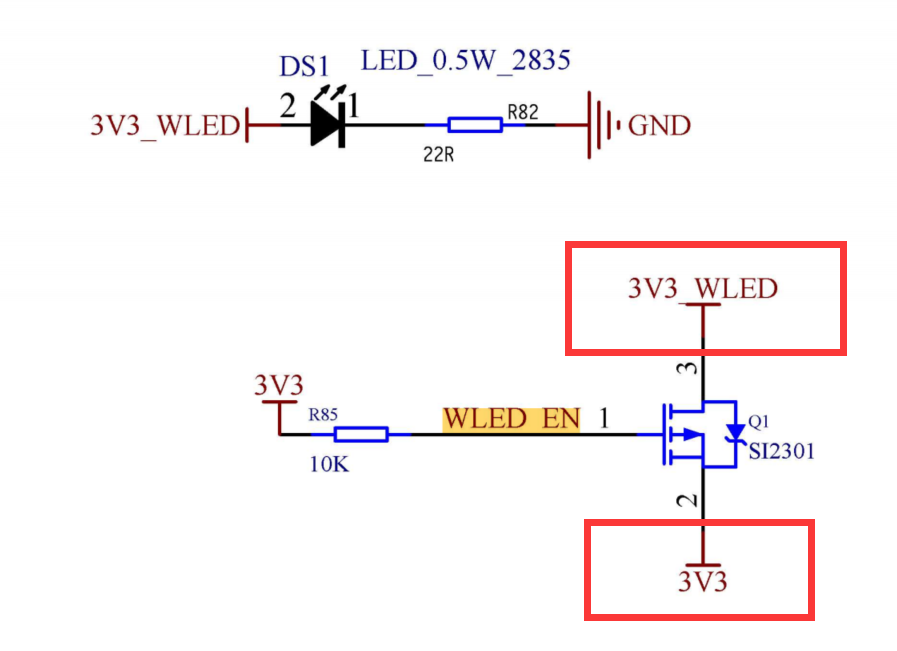
这个3V3_WLED和下边的3V3是不是反了?
2. OV5640供电问题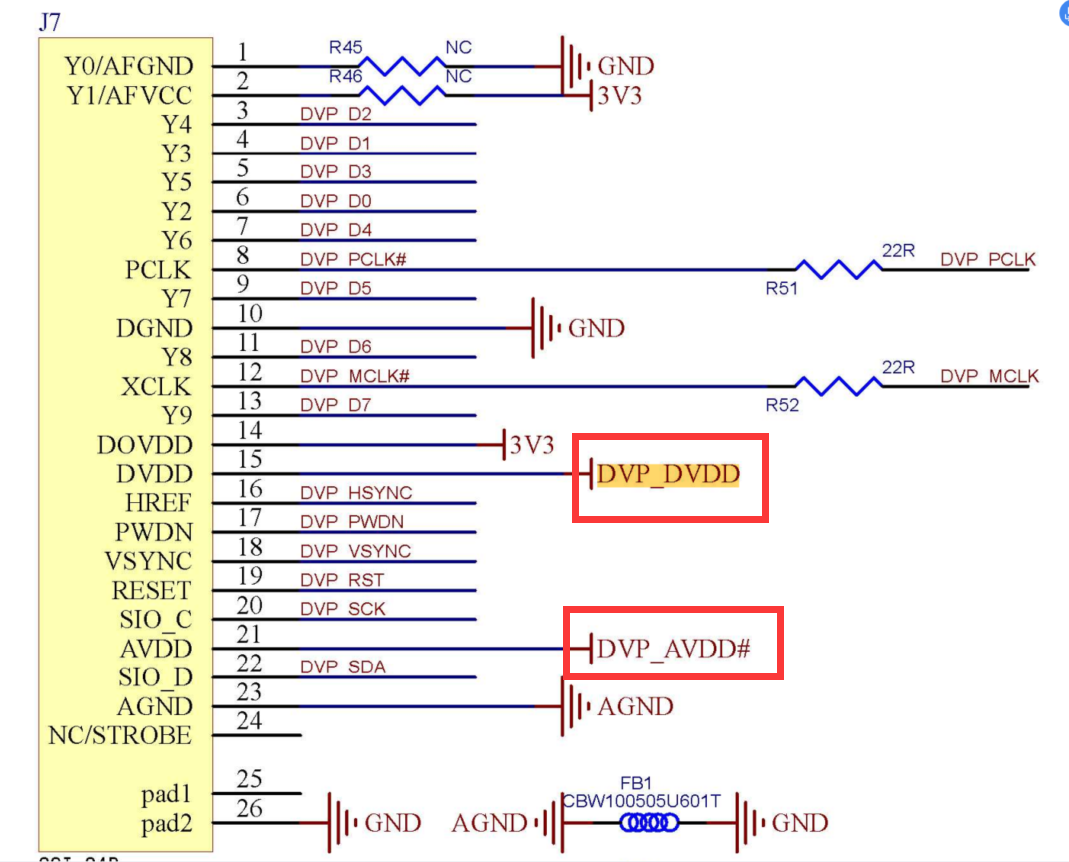
OV5640_自动对焦照相模组应用指南(DVP_接口)__R2.13C.pdf
从OV5640_自动对焦照相模组应用指南(DVP_接口)__R2.13C.pdf中扣出来的说明:
PWND 引脚,高电平有效。当上拉至和 DOVDD 电压一致的高电平时,使 OV5640 进
入节电模式, 不使用时需在模组外部接地。RESETB,低点平有效。置低时复位 OV5640, 不使用时需在模组外部与 DOVDD 连接。
AVDD 为传感器模拟电源引脚,电压范围为 2.6-3.0V (纹波小)。推荐接入 2.8V 电压。
在 OTP 写入状态时,AVDD 必须接入 2.5V+-5%,但是 OPT 读取状态无此要求。DVDD 是传感器数字电源引脚,电压 1.5V±5% (纹波小)。强烈建议使用内部 DVDD
稳压器。DOVDD 是传感器数字 IO 电源引脚,电压范围 1.7V-3.0V(clean),建议为 1.8V。
AGND 与 DGND 引脚应在模组内分开,在模组外 PCB 单点连接,不要在模组内连接。
电容器的位置需靠近其相应的 OV5640 引脚。
D[9:0] 为 OV5640 传感器 10 bit RGB RAW 输出,D[9:2] 为传感器 8-bit YUV/RGB/压
缩信号输出。
荔枝派zeroplus底板ov5640电路问题
这个是没有采集图像时的电压
AVDD2.8V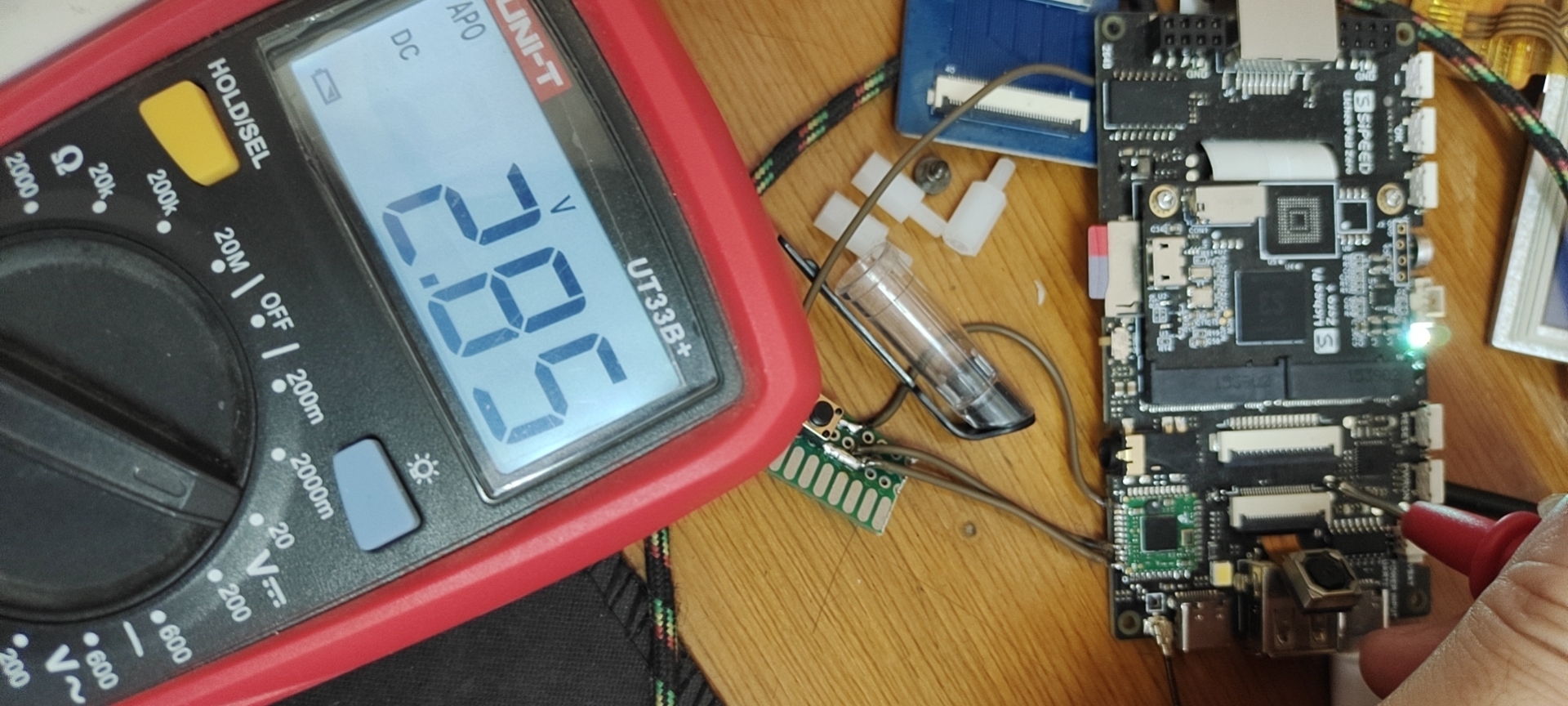
DVDD3.3V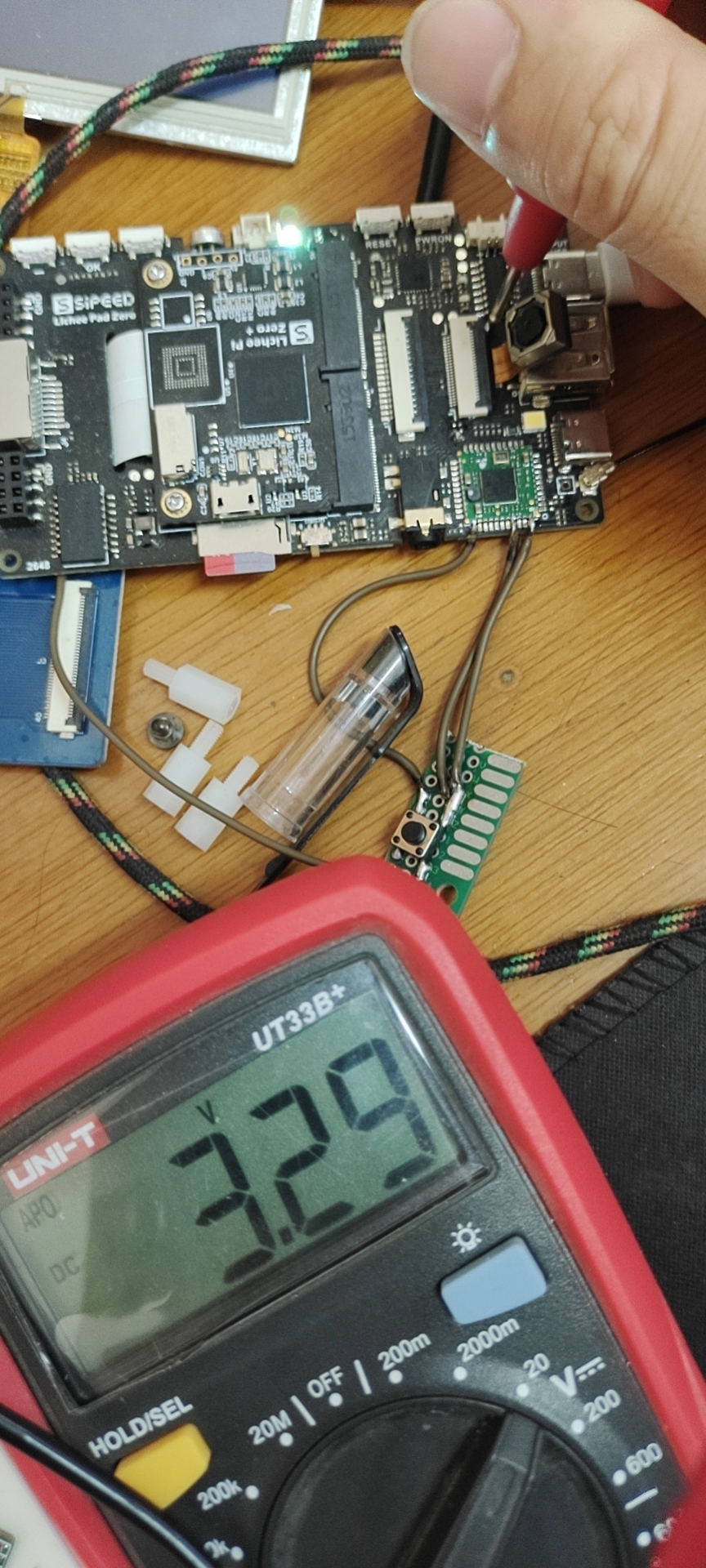
下面时采集图像时候的电压
AVDD2V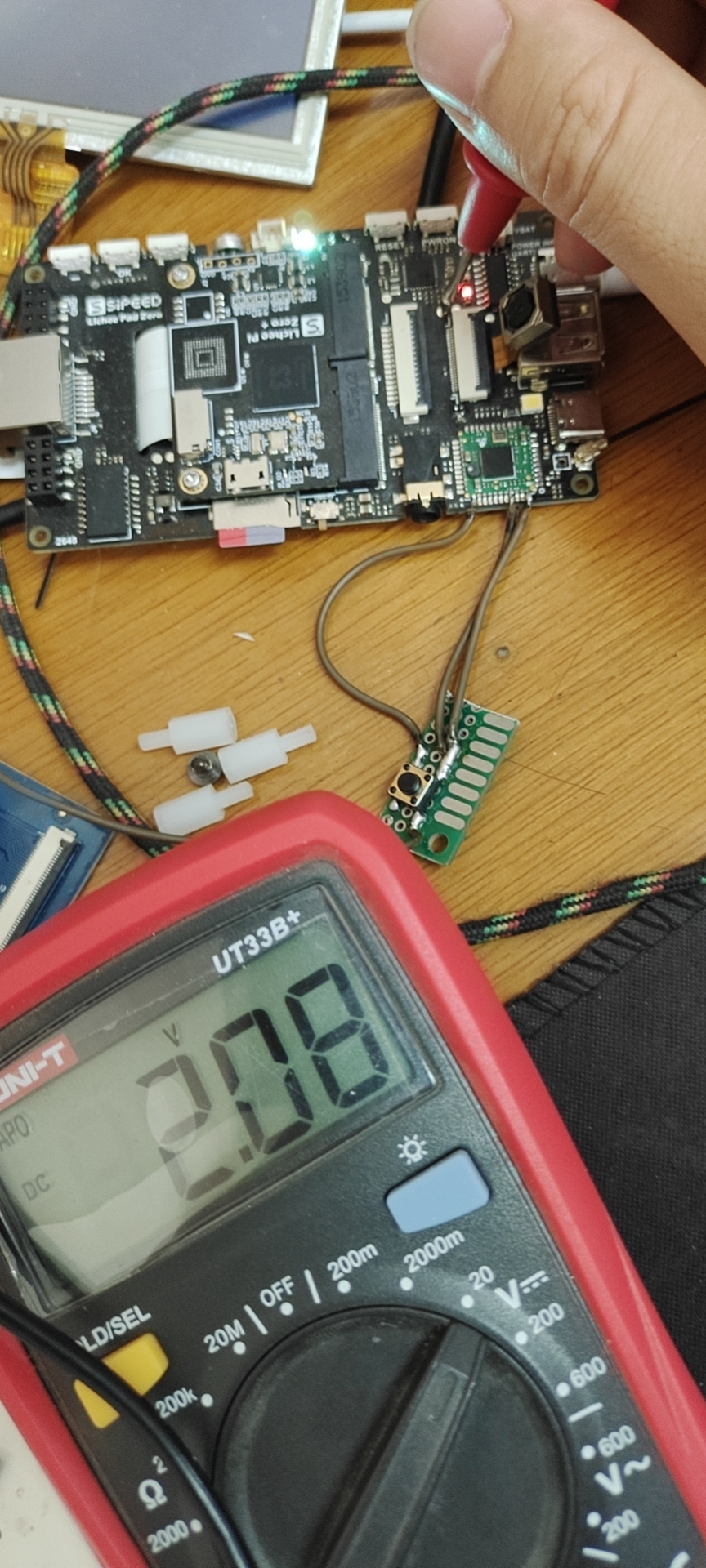
DVDD3.3V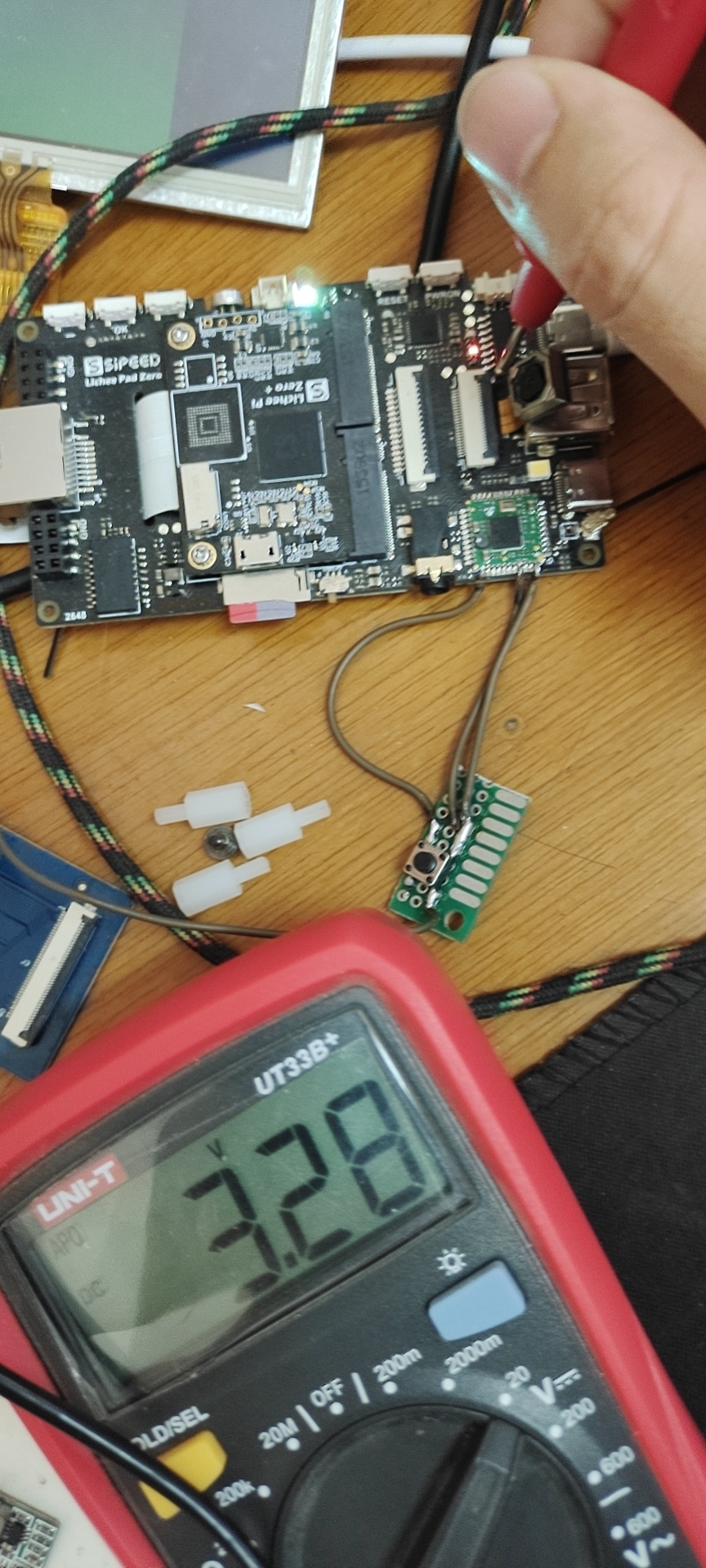
在上图中,左上角屏幕的绿色部分就是摄像头采集的图像,使用python-opencv读取的摄像头视频流
摄像头启动后AVDD供电不足,不管摄像头是否启动,DVDD总是3.3V>推荐的1.5V
也就是说zeroplus接ov5640时候 摄像头电压存在问题,导致不能正确采集图像,图像发绿就不说了,但摄像头烫手怎么解释?
最后我只想说,入坑需谨慎,大家时间都很宝贵。
后续计划在LCD转接板上重新做摄像头的供电,到时候调好分享到这里,要是还不行,只好把板子交给南无伽特林菩萨了
#8 Re: 全志 SOC » 荔枝派zeroplus S3安装opkg » 2021-05-17 01:36:57
microxp wrote:
这个装上占多少空间
大概200多m
#9 Re: 全志 SOC » 荔枝派zeroplus S3安装opkg » 2021-05-17 01:36:01
拉轰的脚踏车 wrote:
楼主好, 我看你的opkg是用命令安装的, 我用buildroot直接生成的opkg 可以用吗?
这个没试过 修改一下源,应该可以。就是opkg.conf这个文件
#10 全志 SOC » 荔枝派zeroplus S3安装opkg » 2021-05-16 09:51:39
- yangshuwei
- 回复: 5
参考:
https://www.bilibili.com/video/BV1iJ411G7ZV
https://github.com/TTHHR/blog/blob/master/alpahOPKG
1.在开发板根目录下 创建opt文件夹,其他名字也可以
2.进入opt,执行命令
wget http://pkg.entware.net/binaries/armv7/installer/entware_install.sh
其中wget需要交叉编译源码,再拷贝到文件系统,这里放上已经编译好的,toolchain是arm-linux-gnueabihf- 6.3版本
wget.tar_20210516-0945.gz
3.在opt目录下执行entware_install.sh脚本
chmod +x ./entware_install.sh
 ./entware_install.sh
这一步前提是必须联网,网口或者wifi都可以
4.添加opkg环境变量到profile
vi /etc/profile
export PATH=$PATH:/opt/bin:/opt/sbin
我这里是
export PATH="/bin:/sbin:/usr/bin:/usr/sbin:/opt/bin:/opt/sbin"

PS1='[\u@\h]:\w$:'
export PS1

export EDITOR='/bin/vi'

export TSLIB_CONSOLEDEVICE=none
export TSLIB_FBDEVICE=/dev/fb0
export TSLIB_TSDEVICE=/dev/input/event1
export TSLIB_CONFFILE=/etc/ts.conf
export TSLIB_PLUGINDIR=/usr/lib/ts
export TSLIB_CALIBFILE=/etc/pointercal
export LD_PRELOAD=/usr/lib/libts.so
export QT_QPA_FB_TSLIB=1

export QT_QPA_GENERIC_PLUGINS=tslib:/dev/input/event1#:edevmouse:/dev/input/event3
export QT_QPA_FONTDIR=/usr/share/fonts
export QT_QPA_PLATFORM_PLUGIN_PATH=/usr/lib/qt/plugins
export QT_QPA_PLATFORM=linuxfb:tty=/dev/fb0
export QT_PLUGIN_PATH=/usr/lib/qt/plugins
export LD_LIBRARY_PATH=usr/lib:/usr/lib/qt/plugins/platforms

#export LD_LIBRARY_PATH=/lib:/usr/lib
#export QT_QPA_PLATFORM=linuxfb:tty=/dev/fb0

# Source configuration files from /etc/profile.d
for i in /etc/profile.d/*.sh ; do
        if [ -r "$i" ]; then
                . $i
        fi
done
unset i

export LD_PRELOAD=""
注意:因为使用了tslib的原因
每次执行opkg命令或者开机时都会提醒
ERROR: ld.so: object '/usr/lib/libts.so' from LD_PRELOAD cannot be preloaded (internal error): ignored.这个错误
解决办法就是将LD_PRELOAD变量清空
如上profile最后一行。
5.使用opkg安装gcc,git,bluez,nano,python3,python3-pip等等
如果出现不能下载或者下载慢的情况,手机开热点也许会好些
6.如果使用buildroot里面配置的opkg,需要修改opkg.conf文件的内容,重新指定源
src/gz entware http://bin.entware.net/armv7sf-k2.6
dest root /
dest ram /opt/tmp
lists_dir ext /opt/var/opkg-lists
option tmp_dir /opt/tmp
arch all 100
arch armv7soft 150
arch armv7-2.6 160#11 Re: 全志 SOC » 荔枝派zeroplus(全志S3) RTL8723BS 蓝牙调试问题 » 2021-05-14 21:01:18
Licheepi wrote:
淘宝买的的RTL8723bs模块都没有BT的串口了,你这怎么焊板子上的,能拍个照看看吗,我想连个蓝牙键盘
淘宝搜一下荔枝派zero plus,这个板子上带了rtl8723bs
WIFI sdio
蓝牙 UART
#12 Re: 全志 SOC » 荔枝派zeroplus(全志S3) RTL8723BS 蓝牙调试问题 » 2021-05-14 17:30:49
扶我起来,我还要水 
#13 Re: 全志 SOC » 荔枝派zeroplus(全志S3) RTL8723BS 蓝牙调试问题 » 2021-05-14 17:30:10
解决了,我靠
完整的命令是这个,
./rtk_hciattach -n -s 115200 ttyS1 rtk_h5 > hciattach.txt &
我一直用的
./rtk_hciattach -n -s 115200 ttyS1 rtk_h5
这导致在/lib/firmware/rtl_bt/目录下没有有效的hciattach.txt文件
使用这个解决了
./rtk_hciattach -n -s 115200 ttyS1 rtk_h5 > hciattach.txt &
#14 Re: 全志 SOC » 荔枝派zeroplus(全志S3) RTL8723BS 蓝牙调试问题 » 2021-05-14 17:24:50
将串口1的RTS CTS拉低,可以烧写蓝牙固件了
[root@Zero_Plus]:~/rtl8723bs_bt$:insmod /lib/modules/5.1.0/kernel/drivers/blueto
oth/hci_uart.ko
[ 8655.054822] Bluetooth: HCI UART driver ver 2.3
[ 8655.059303] Bluetooth: HCI UART protocol H4 registered
[ 8655.064768] Bluetooth: HCI UART protocol Three-wire (H5) registered
下载固件,需要手动修改rtl_config文件中的波特率为115200
[root@Zero_Plus]:~/rtl8723bs_bt2$:./rtk_hciattach -n -s 115200 /dev/ttyS1 rtk_h5
Realtek Bluetooth init uart with init speed:115200, final_speed:115200, type:HCI UART H5
Realtek Bluetooth :Realtek hciattach version 2.5

Realtek Bluetooth :3-wire sync pattern resend : 1, len: 8

Realtek Bluetooth :Get SYNC Resp Pkt

Realtek Bluetooth :Get SYNC pkt-active mode

Realtek Bluetooth :3-wire config pattern resend : 1 , len: 10
Realtek Bluetooth :Get CONFG pkt-active mode

Realtek Bluetooth :Get CONFG resp pkt-active mode

Realtek Bluetooth :H5 init finished

Realtek Bluetooth :config offset(f4),length(8)
Realtek Bluetooth :config baud rate to :252c014, hwflowcontrol:5f, 1
Realtek Bluetooth :config offset(27),length(1)
Realtek Bluetooth :config offset(fe),length(1)
Realtek Bluetooth :config offset(15b),length(4)
Realtek Bluetooth :config offset(1e3),length(1)
Realtek Bluetooth :Get config baud rate from config file:252c014
Realtek Bluetooth :Load FW OK
Realtek Bluetooth :RTK send HCI_VENDOR_READ_RTK_ROM_VERISION_Command

Realtek Bluetooth :Received reliable seqno 0 from card
Realtek Bluetooth :receive hci command complete event with command:1001

Realtek Bluetooth :Read RTK LMP version with Status:0
Realtek Bluetooth :gLmpVersion = 0x8723
Realtek Bluetooth :RTK send HCI_VENDOR_READ_RTK_ROM_VERISION_Command

Realtek Bluetooth :Received reliable seqno 1 from card
Realtek Bluetooth :receive hci command complete event with command:fc6d

Realtek Bluetooth :Read RTK rom version with Status:0
Realtek Bluetooth :rtk_hw_cfg.eversion = 1
Realtek Bluetooth :rtk_get_fw_project_id: opcode 0, len 1, data 1
Realtek Bluetooth :fw_ver 0x373e6962, patch_num 3
Realtek Bluetooth :patch length is 0x5c5c
Realtek Bluetooth :start offset is 0x6c00
Realtek Bluetooth :fw: exists, config file: exists
Realtek Bluetooth :baudrate in change speed command: 0x14 0xc0 0x52 0x2

Realtek Bluetooth :Received reliable seqno 2 from card
Realtek Bluetooth :receive hci command complete event with command:fc17

Realtek Bluetooth :Change BD Rate with status:0
Realtek Bluetooth :final_speed 115200

Realtek Bluetooth :hw flow control enable
Realtek Bluetooth :iEndIndex:94  iLastPacketLen:11 iAdditionpkt:6

Realtek Bluetooth :hci_download_patch tx_index:0 rx_index: -1

Realtek Bluetooth :Received reliable seqno 3 from card
Realtek Bluetooth :rtk_hw_cfg.rx_index 0

Realtek Bluetooth :hci_download_patch tx_index:1 rx_index: 0

Realtek Bluetooth :Received reliable seqno 4 from card
Realtek Bluetooth :rtk_hw_cfg.rx_index 1

Realtek Bluetooth :hci_download_patch tx_index:2 rx_index: 1

Realtek Bluetooth :Received reliable seqno 5 from card
Realtek Bluetooth :rtk_hw_cfg.rx_index 2

Realtek Bluetooth :hci_download_patch tx_index:3 rx_index: 2

Realtek Bluetooth :Received reliable seqno 6 from card
Realtek Bluetooth :rtk_hw_cfg.rx_index 3

Realtek Bluetooth :hci_download_patch tx_index:4 rx_index: 3

Realtek Bluetooth :Received reliable seqno 7 from card
Realtek Bluetooth :rtk_hw_cfg.rx_index 4

Realtek Bluetooth :hci_download_patch tx_index:5 rx_index: 4

Realtek Bluetooth :Received reliable seqno 0 from card
Realtek Bluetooth :rtk_hw_cfg.rx_index 5

Realtek Bluetooth :hci_download_patch tx_index:6 rx_index: 5

Realtek Bluetooth :Received reliable seqno 1 from card
Realtek Bluetooth :rtk_hw_cfg.rx_index 6

Realtek Bluetooth :hci_download_patch tx_index:7 rx_index: 6

Realtek Bluetooth :Received reliable seqno 2 from card
Realtek Bluetooth :rtk_hw_cfg.rx_index 7

Realtek Bluetooth :hci_download_patch tx_index:8 rx_index: 7

Realtek Bluetooth :Received reliable seqno 3 from card
Realtek Bluetooth :rtk_hw_cfg.rx_index 8

Realtek Bluetooth :hci_download_patch tx_index:9 rx_index: 8

Realtek Bluetooth :Received reliable seqno 4 from card
Realtek Bluetooth :rtk_hw_cfg.rx_index 9

Realtek Bluetooth :hci_download_patch tx_index:10 rx_index: 9

Realtek Bluetooth :Received reliable seqno 5 from card
Realtek Bluetooth :rtk_hw_cfg.rx_index 10

Realtek Bluetooth :hci_download_patch tx_index:11 rx_index: 10

Realtek Bluetooth :Received reliable seqno 6 from card
Realtek Bluetooth :rtk_hw_cfg.rx_index 11

Realtek Bluetooth :hci_download_patch tx_index:12 rx_index: 11

Realtek Bluetooth :Received reliable seqno 7 from card
Realtek Bluetooth :rtk_hw_cfg.rx_index 12

Realtek Bluetooth :hci_download_patch tx_index:13 rx_index: 12

Realtek Bluetooth :Received reliable seqno 0 from card
Realtek Bluetooth :rtk_hw_cfg.rx_index 13

Realtek Bluetooth :hci_download_patch tx_index:14 rx_index: 13

Realtek Bluetooth :Received reliable seqno 1 from card
Realtek Bluetooth :rtk_hw_cfg.rx_index 14

Realtek Bluetooth :hci_download_patch tx_index:15 rx_index: 14

Realtek Bluetooth :Received reliable seqno 2 from card
Realtek Bluetooth :rtk_hw_cfg.rx_index 15

Realtek Bluetooth :hci_download_patch tx_index:16 rx_index: 15

Realtek Bluetooth :Received reliable seqno 3 from card
Realtek Bluetooth :rtk_hw_cfg.rx_index 16

Realtek Bluetooth :hci_download_patch tx_index:17 rx_index: 16

Realtek Bluetooth :Received reliable seqno 4 from card
Realtek Bluetooth :rtk_hw_cfg.rx_index 17

Realtek Bluetooth :hci_download_patch tx_index:18 rx_index: 17

Realtek Bluetooth :Received reliable seqno 5 from card
Realtek Bluetooth :rtk_hw_cfg.rx_index 18

Realtek Bluetooth :hci_download_patch tx_index:19 rx_index: 18

Realtek Bluetooth :Received reliable seqno 6 from card
Realtek Bluetooth :rtk_hw_cfg.rx_index 19

Realtek Bluetooth :hci_download_patch tx_index:20 rx_index: 19

Realtek Bluetooth :Received reliable seqno 7 from card
Realtek Bluetooth :rtk_hw_cfg.rx_index 20

Realtek Bluetooth :hci_download_patch tx_index:21 rx_index: 20

Realtek Bluetooth :Received reliable seqno 0 from card
Realtek Bluetooth :rtk_hw_cfg.rx_index 21

Realtek Bluetooth :hci_download_patch tx_index:22 rx_index: 21

Realtek Bluetooth :Received reliable seqno 1 from card
Realtek Bluetooth :rtk_hw_cfg.rx_index 22

Realtek Bluetooth :hci_download_patch tx_index:23 rx_index: 22

Realtek Bluetooth :Received reliable seqno 2 from card
Realtek Bluetooth :rtk_hw_cfg.rx_index 23

Realtek Bluetooth :hci_download_patch tx_index:24 rx_index: 23

Realtek Bluetooth :Received reliable seqno 3 from card
Realtek Bluetooth :rtk_hw_cfg.rx_index 24

Realtek Bluetooth :hci_download_patch tx_index:25 rx_index: 24

Realtek Bluetooth :Received reliable seqno 4 from card
Realtek Bluetooth :rtk_hw_cfg.rx_index 25

Realtek Bluetooth :hci_download_patch tx_index:26 rx_index: 25

Realtek Bluetooth :Received reliable seqno 5 from card
Realtek Bluetooth :rtk_hw_cfg.rx_index 26

Realtek Bluetooth :hci_download_patch tx_index:27 rx_index: 26

Realtek Bluetooth :Received reliable seqno 6 from card
Realtek Bluetooth :rtk_hw_cfg.rx_index 27

Realtek Bluetooth :hci_download_patch tx_index:28 rx_index: 27

Realtek Bluetooth :Received reliable seqno 7 from card
Realtek Bluetooth :rtk_hw_cfg.rx_index 28

Realtek Bluetooth :hci_download_patch tx_index:29 rx_index: 28

Realtek Bluetooth :Received reliable seqno 0 from card
Realtek Bluetooth :rtk_hw_cfg.rx_index 29

Realtek Bluetooth :hci_download_patch tx_index:30 rx_index: 29

Realtek Bluetooth :Received reliable seqno 1 from card
Realtek Bluetooth :rtk_hw_cfg.rx_index 30

Realtek Bluetooth :hci_download_patch tx_index:31 rx_index: 30

Realtek Bluetooth :Received reliable seqno 2 from card
Realtek Bluetooth :rtk_hw_cfg.rx_index 31

Realtek Bluetooth :hci_download_patch tx_index:32 rx_index: 31

Realtek Bluetooth :Received reliable seqno 3 from card
Realtek Bluetooth :rtk_hw_cfg.rx_index 32

Realtek Bluetooth :hci_download_patch tx_index:33 rx_index: 32

Realtek Bluetooth :Received reliable seqno 4 from card
Realtek Bluetooth :rtk_hw_cfg.rx_index 33

Realtek Bluetooth :hci_download_patch tx_index:34 rx_index: 33

Realtek Bluetooth :Received reliable seqno 5 from card
Realtek Bluetooth :rtk_hw_cfg.rx_index 34

Realtek Bluetooth :hci_download_patch tx_index:35 rx_index: 34

Realtek Bluetooth :Received reliable seqno 6 from card
Realtek Bluetooth :rtk_hw_cfg.rx_index 35

Realtek Bluetooth :hci_download_patch tx_index:36 rx_index: 35

Realtek Bluetooth :Received reliable seqno 7 from card
Realtek Bluetooth :rtk_hw_cfg.rx_index 36

Realtek Bluetooth :hci_download_patch tx_index:37 rx_index: 36

Realtek Bluetooth :Received reliable seqno 0 from card
Realtek Bluetooth :rtk_hw_cfg.rx_index 37

Realtek Bluetooth :hci_download_patch tx_index:38 rx_index: 37

Realtek Bluetooth :Received reliable seqno 1 from card
Realtek Bluetooth :rtk_hw_cfg.rx_index 38

Realtek Bluetooth :hci_download_patch tx_index:39 rx_index: 38

Realtek Bluetooth :Received reliable seqno 2 from card
Realtek Bluetooth :rtk_hw_cfg.rx_index 39

Realtek Bluetooth :hci_download_patch tx_index:40 rx_index: 39

Realtek Bluetooth :Received reliable seqno 3 from card
Realtek Bluetooth :rtk_hw_cfg.rx_index 40

Realtek Bluetooth :hci_download_patch tx_index:41 rx_index: 40

Realtek Bluetooth :Received reliable seqno 4 from card
Realtek Bluetooth :rtk_hw_cfg.rx_index 41

Realtek Bluetooth :hci_download_patch tx_index:42 rx_index: 41

Realtek Bluetooth :Received reliable seqno 5 from card
Realtek Bluetooth :rtk_hw_cfg.rx_index 42

Realtek Bluetooth :hci_download_patch tx_index:43 rx_index: 42

Realtek Bluetooth :Received reliable seqno 6 from card
Realtek Bluetooth :rtk_hw_cfg.rx_index 43

Realtek Bluetooth :hci_download_patch tx_index:44 rx_index: 43

Realtek Bluetooth :Received reliable seqno 7 from card
Realtek Bluetooth :rtk_hw_cfg.rx_index 44

Realtek Bluetooth :hci_download_patch tx_index:45 rx_index: 44

Realtek Bluetooth :Received reliable seqno 0 from card
Realtek Bluetooth :rtk_hw_cfg.rx_index 45

Realtek Bluetooth :hci_download_patch tx_index:46 rx_index: 45

Realtek Bluetooth :Received reliable seqno 1 from card
Realtek Bluetooth :rtk_hw_cfg.rx_index 46

Realtek Bluetooth :hci_download_patch tx_index:47 rx_index: 46

Realtek Bluetooth :Received reliable seqno 2 from card
Realtek Bluetooth :rtk_hw_cfg.rx_index 47

Realtek Bluetooth :hci_download_patch tx_index:48 rx_index: 47

Realtek Bluetooth :Received reliable seqno 3 from card
Realtek Bluetooth :rtk_hw_cfg.rx_index 48

Realtek Bluetooth :hci_download_patch tx_index:49 rx_index: 48

Realtek Bluetooth :Received reliable seqno 4 from card
Realtek Bluetooth :rtk_hw_cfg.rx_index 49

Realtek Bluetooth :hci_download_patch tx_index:50 rx_index: 49

Realtek Bluetooth :Received reliable seqno 5 from card
Realtek Bluetooth :rtk_hw_cfg.rx_index 50

Realtek Bluetooth :hci_download_patch tx_index:51 rx_index: 50

Realtek Bluetooth :Received reliable seqno 6 from card
Realtek Bluetooth :rtk_hw_cfg.rx_index 51

Realtek Bluetooth :hci_download_patch tx_index:52 rx_index: 51

Realtek Bluetooth :Received reliable seqno 7 from card
Realtek Bluetooth :rtk_hw_cfg.rx_index 52

Realtek Bluetooth :hci_download_patch tx_index:53 rx_index: 52

Realtek Bluetooth :Received reliable seqno 0 from card
Realtek Bluetooth :rtk_hw_cfg.rx_index 53

Realtek Bluetooth :hci_download_patch tx_index:54 rx_index: 53

Realtek Bluetooth :Received reliable seqno 1 from card
Realtek Bluetooth :rtk_hw_cfg.rx_index 54

Realtek Bluetooth :hci_download_patch tx_index:55 rx_index: 54

Realtek Bluetooth :Received reliable seqno 2 from card
Realtek Bluetooth :rtk_hw_cfg.rx_index 55

Realtek Bluetooth :hci_download_patch tx_index:56 rx_index: 55

Realtek Bluetooth :Received reliable seqno 3 from card
Realtek Bluetooth :rtk_hw_cfg.rx_index 56

Realtek Bluetooth :hci_download_patch tx_index:57 rx_index: 56

Realtek Bluetooth :Received reliable seqno 4 from card
Realtek Bluetooth :rtk_hw_cfg.rx_index 57

Realtek Bluetooth :hci_download_patch tx_index:58 rx_index: 57

Realtek Bluetooth :Received reliable seqno 5 from card
Realtek Bluetooth :rtk_hw_cfg.rx_index 58

Realtek Bluetooth :hci_download_patch tx_index:59 rx_index: 58

Realtek Bluetooth :Received reliable seqno 6 from card
Realtek Bluetooth :rtk_hw_cfg.rx_index 59

Realtek Bluetooth :hci_download_patch tx_index:60 rx_index: 59

Realtek Bluetooth :Received reliable seqno 7 from card
Realtek Bluetooth :rtk_hw_cfg.rx_index 60

Realtek Bluetooth :hci_download_patch tx_index:61 rx_index: 60

Realtek Bluetooth :Received reliable seqno 0 from card
Realtek Bluetooth :rtk_hw_cfg.rx_index 61

Realtek Bluetooth :hci_download_patch tx_index:62 rx_index: 61

Realtek Bluetooth :Received reliable seqno 1 from card
Realtek Bluetooth :rtk_hw_cfg.rx_index 62

Realtek Bluetooth :hci_download_patch tx_index:63 rx_index: 62

Realtek Bluetooth :Received reliable seqno 2 from card
Realtek Bluetooth :rtk_hw_cfg.rx_index 63

Realtek Bluetooth :hci_download_patch tx_index:64 rx_index: 63

Realtek Bluetooth :Received reliable seqno 3 from card
Realtek Bluetooth :rtk_hw_cfg.rx_index 64

Realtek Bluetooth :hci_download_patch tx_index:65 rx_index: 64

Realtek Bluetooth :Received reliable seqno 4 from card
Realtek Bluetooth :rtk_hw_cfg.rx_index 65

Realtek Bluetooth :hci_download_patch tx_index:66 rx_index: 65

Realtek Bluetooth :Received reliable seqno 5 from card
Realtek Bluetooth :rtk_hw_cfg.rx_index 66

Realtek Bluetooth :hci_download_patch tx_index:67 rx_index: 66

Realtek Bluetooth :Received reliable seqno 6 from card
Realtek Bluetooth :rtk_hw_cfg.rx_index 67

Realtek Bluetooth :hci_download_patch tx_index:68 rx_index: 67

Realtek Bluetooth :Received reliable seqno 7 from card
Realtek Bluetooth :rtk_hw_cfg.rx_index 68

Realtek Bluetooth :hci_download_patch tx_index:69 rx_index: 68

Realtek Bluetooth :Received reliable seqno 0 from card
Realtek Bluetooth :rtk_hw_cfg.rx_index 69

Realtek Bluetooth :hci_download_patch tx_index:70 rx_index: 69

Realtek Bluetooth :Received reliable seqno 1 from card
Realtek Bluetooth :rtk_hw_cfg.rx_index 70

Realtek Bluetooth :hci_download_patch tx_index:71 rx_index: 70

Realtek Bluetooth :Received reliable seqno 2 from card
Realtek Bluetooth :rtk_hw_cfg.rx_index 71

Realtek Bluetooth :hci_download_patch tx_index:72 rx_index: 71

Realtek Bluetooth :Received reliable seqno 3 from card
Realtek Bluetooth :rtk_hw_cfg.rx_index 72

Realtek Bluetooth :hci_download_patch tx_index:73 rx_index: 72

Realtek Bluetooth :Received reliable seqno 4 from card
Realtek Bluetooth :rtk_hw_cfg.rx_index 73

Realtek Bluetooth :hci_download_patch tx_index:74 rx_index: 73

Realtek Bluetooth :Received reliable seqno 5 from card
Realtek Bluetooth :rtk_hw_cfg.rx_index 74

Realtek Bluetooth :hci_download_patch tx_index:75 rx_index: 74

Realtek Bluetooth :Received reliable seqno 6 from card
Realtek Bluetooth :rtk_hw_cfg.rx_index 75

Realtek Bluetooth :hci_download_patch tx_index:76 rx_index: 75

Realtek Bluetooth :Received reliable seqno 7 from card
Realtek Bluetooth :rtk_hw_cfg.rx_index 76

Realtek Bluetooth :hci_download_patch tx_index:77 rx_index: 76

Realtek Bluetooth :Received reliable seqno 0 from card
Realtek Bluetooth :rtk_hw_cfg.rx_index 77

Realtek Bluetooth :hci_download_patch tx_index:78 rx_index: 77

Realtek Bluetooth :Received reliable seqno 1 from card
Realtek Bluetooth :rtk_hw_cfg.rx_index 78

Realtek Bluetooth :hci_download_patch tx_index:79 rx_index: 78

Realtek Bluetooth :Received reliable seqno 2 from card
Realtek Bluetooth :rtk_hw_cfg.rx_index 79

Realtek Bluetooth :hci_download_patch tx_index:80 rx_index: 79

Realtek Bluetooth :Received reliable seqno 3 from card
Realtek Bluetooth :rtk_hw_cfg.rx_index 80

Realtek Bluetooth :hci_download_patch tx_index:81 rx_index: 80

Realtek Bluetooth :Received reliable seqno 4 from card
Realtek Bluetooth :rtk_hw_cfg.rx_index 81

Realtek Bluetooth :hci_download_patch tx_index:82 rx_index: 81

Realtek Bluetooth :Received reliable seqno 5 from card
Realtek Bluetooth :rtk_hw_cfg.rx_index 82

Realtek Bluetooth :hci_download_patch tx_index:83 rx_index: 82

Realtek Bluetooth :Received reliable seqno 6 from card
Realtek Bluetooth :rtk_hw_cfg.rx_index 83

Realtek Bluetooth :hci_download_patch tx_index:84 rx_index: 83

Realtek Bluetooth :Received reliable seqno 7 from card
Realtek Bluetooth :rtk_hw_cfg.rx_index 84

Realtek Bluetooth :hci_download_patch tx_index:85 rx_index: 84

Realtek Bluetooth :Received reliable seqno 0 from card
Realtek Bluetooth :rtk_hw_cfg.rx_index 85

Realtek Bluetooth :hci_download_patch tx_index:86 rx_index: 85

Realtek Bluetooth :Received reliable seqno 1 from card
Realtek Bluetooth :rtk_hw_cfg.rx_index 86

Realtek Bluetooth :hci_download_patch tx_index:87 rx_index: 86

Realtek Bluetooth :Received reliable seqno 2 from card
Realtek Bluetooth :rtk_hw_cfg.rx_index 87

Realtek Bluetooth :hci_download_patch tx_index:88 rx_index: 87

Realtek Bluetooth :Received reliable seqno 3 from card
Realtek Bluetooth :rtk_hw_cfg.rx_index 88

Realtek Bluetooth :hci_download_patch tx_index:89 rx_index: 88

Realtek Bluetooth :Received reliable seqno 4 from card
Realtek Bluetooth :rtk_hw_cfg.rx_index 89

Realtek Bluetooth :hci_download_patch tx_index:90 rx_index: 89

Realtek Bluetooth :Received reliable seqno 5 from card
Realtek Bluetooth :rtk_hw_cfg.rx_index 90

Realtek Bluetooth :hci_download_patch tx_index:91 rx_index: 90

Realtek Bluetooth :Received reliable seqno 6 from card
Realtek Bluetooth :rtk_hw_cfg.rx_index 91

Realtek Bluetooth :hci_download_patch tx_index:92 rx_index: 91

Realtek Bluetooth :Received reliable seqno 7 from card
Realtek Bluetooth :rtk_hw_cfg.rx_index 92

Realtek Bluetooth :hci_download_patch tx_index:93 rx_index: 92

Realtek Bluetooth :Received reliable seqno 0 from card
Realtek Bluetooth :rtk_hw_cfg.rx_index 93

Realtek Bluetooth :hci_download_patch tx_index:94 rx_index: 93

Realtek Bluetooth :Received reliable seqno 1 from card
Realtek Bluetooth :rtk_hw_cfg.rx_index 94

Realtek Bluetooth :hci_download_patch tx_index:95 rx_index: 94

Realtek Bluetooth :Received reliable seqno 2 from card
Realtek Bluetooth :rtk_hw_cfg.rx_index 95

Realtek Bluetooth :hci_download_patch tx_index:96 rx_index: 95

Realtek Bluetooth :Received reliable seqno 3 from card
Realtek Bluetooth :rtk_hw_cfg.rx_index 96

Realtek Bluetooth :hci_download_patch tx_index:97 rx_index: 96

Realtek Bluetooth :Received reliable seqno 4 from card
Realtek Bluetooth :rtk_hw_cfg.rx_index 97

Realtek Bluetooth :hci_download_patch tx_index:98 rx_index: 97

Realtek Bluetooth :Received reliable seqno 5 from card
Realtek Bluetooth :rtk_hw_cfg.rx_index 98

Realtek Bluetooth :hci_download_patch tx_index:99 rx_index: 98

Realtek Bluetooth :Received reliable seqno 6 from card
Realtek Bluetooth :rtk_hw_cfg.rx_index 99

Realtek Bluetooth :Send FW last command
Realtek Bluetooth :hci_download_patch tx_index:100 rx_index: 99

Realtek Bluetooth :Received reliable seqno 7 from card
Realtek Bluetooth :rtk_hw_cfg.rx_index 100

Realtek Bluetooth :Init Process finished
Realtek Bluetooth post process
Device setup complete
之后使用hciconfig -a 啥也没有,是不是少了什么步骤,大佬们求带
[root@Zero_Plus]:~/rtl8723bs_bt2$:hciconfig -a
[root@Zero_Plus]:~/rtl8723bs_bt2$:
[root@Zero_Plus]:~/rtl8723bs_bt2$:
[root@Zero_Plus]:~/rtl8723bs_bt2$:
[root@Zero_Plus]:~/rtl8723bs_bt2$:
[root@Zero_Plus]:~/rtl8723bs_bt2$:#15 全志 SOC » 荔枝派zeroplus(全志S3) RTL8723BS 蓝牙调试问题 » 2021-05-14 10:44:14
- yangshuwei
- 回复: 6
问题描述:
挂载蓝牙串口驱动
insmod /lib/modules/5.1.0/kernel/drivers/bluetooth/hci_uart.ko
dmesg | grep tty

./rtk_hciattach -n -s 115200 /dev/ttyS1 rtk_h5
log如下
[root@Zero_Plus]:~/rtl8723bs_bt2$:./download.sh
[  277.298194] Bluetooth: HCI UART driver ver 2.3
[  277.302843] Bluetooth: HCI UART protocol H4 registered
[  277.308189] Bluetooth: HCI UART protocol Three-wire (H5) registered
[    0.000000] Kernel command line: console=ttyS0,115200 panic=5 rootwait root=/dev/mmcblk0p2 rw earlyprintk
[    0.272564] printk: console [ttyS0] disabled
[    0.292916] 1c28000.serial: ttyS0 at MMIO 0x1c28000 (irq = 38, base_baud = 7500000) is a U6_16550A
[    0.935558] printk: console [ttyS0] enabled
[    0.973431] 1c28400.serial: ttyS1 at MMIO 0x1c28400 (irq = 39, base_baud = 7500000) is a U6_16550A
[    1.005650] 1c28800.serial: ttyS2 at MMIO 0x1c28800 (irq = 40, base_baud = 7500000) is a U6_16550A
Realtek Bluetooth init uart with init speed:115200, final_speed:115200, type:HCI UART H5
Realtek Bluetooth :Realtek hciattach version 2.5

Realtek Bluetooth :3-wire sync pattern resend : 1, len: 8

Realtek Bluetooth :Get SYNC Resp Pkt

Realtek Bluetooth :Get SYNC pkt-active mode

Realtek Bluetooth :3-wire config pattern resend : 1 , len: 10
Realtek Bluetooth :Get CONFG pkt-active mode

Realtek Bluetooth :Get CONFG resp pkt-active mode

Realtek Bluetooth :H5 init finished

Realtek Bluetooth :config offset(f4),length(8)
Realtek Bluetooth :config baud rate to :4928002, hwflowcontrol:5f, 1
Realtek Bluetooth :config offset(27),length(1)
Realtek Bluetooth :config offset(fe),length(1)
Realtek Bluetooth :config offset(15b),length(4)
Realtek Bluetooth :config offset(1e3),length(1)
Realtek Bluetooth :Get config baud rate from config file:4928002
Realtek Bluetooth :Load FW OK
Realtek Bluetooth :RTK send HCI_VENDOR_READ_RTK_ROM_VERISION_Command

Realtek Bluetooth :Received reliable seqno 0 from card
Realtek Bluetooth :receive hci command complete event with command:1001

Realtek Bluetooth :Read RTK LMP version with Status:0
Realtek Bluetooth :gLmpVersion = 0x8723
Realtek Bluetooth :RTK send HCI_VENDOR_READ_RTK_ROM_VERISION_Command

Realtek Bluetooth :Received reliable seqno 1 from card
Realtek Bluetooth :receive hci command complete event with command:fc6d

Realtek Bluetooth :Read RTK rom version with Status:0
Realtek Bluetooth :rtk_hw_cfg.eversion = 1
Realtek Bluetooth :rtk_get_fw_project_id: opcode 0, len 1, data 1
Realtek Bluetooth :fw_ver 0x1e3ee40e, patch_num 2
Realtek Bluetooth :patch length is 0x5e90
Realtek Bluetooth :start offset is 0x4f00
Realtek Bluetooth :fw: exists, config file: exists
Realtek Bluetooth :baudrate in change speed command: 0x2 0x80 0x92 0x4

Realtek Bluetooth :Received reliable seqno 2 from card
Realtek Bluetooth :receive hci command complete event with command:fc17

Realtek Bluetooth :Change BD Rate with status:0
Realtek Bluetooth :final_speed 1500000

Realtek Bluetooth :hw flow control enable
Realtek Bluetooth :iEndIndex:96  iLastPacketLen:71 iAdditionpkt:4

Realtek Bluetooth :hci_download_patch tx_index:0 rx_index: -1

Realtek Bluetooth ERROR: patch timerout, retry:

Realtek Bluetooth :3-wire download patch re send:0
毫无办法,只能求助大佬们了
而且这板子更新固件失败后 必须断电重启才能重新执行./rtk_hciattach -n -s 115200 /dev/ttyS1 rtk_h5
不然报错如下
Realtek Bluetooth init uart with init speed:115200, final_speed:115200, type:HCI UART H5
Realtek Bluetooth :Realtek hciattach version 2.5

Realtek Bluetooth :3-wire sync pattern resend : 1, len: 8

Realtek Bluetooth :3-wire sync pattern resend : 2, len: 8

Realtek Bluetooth :3-wire sync pattern resend : 3, len: 8

Realtek Bluetooth :3-wire sync pattern resend : 4, len: 8

Realtek Bluetooth :3-wire sync pattern resend : 5, len: 8

Realtek Bluetooth :3-wire sync pattern resend : 6, len: 8

Realtek Bluetooth :3-wire sync pattern resend : 7, len: 8

Realtek Bluetooth :3-wire sync pattern resend : 8, len: 8#16 Re: 全志 SOC » Allwinner S3 u-boot 2020.04 (DisplayEngine2 + Fastboot线刷) » 2021-05-12 17:40:50
unturned3 wrote:
yangshuwei wrote:
大佬,用你的uboot启动内核出现下面错误,需要做哪些设置呢
好像有些重要信息被你截取掉了……发一下完整的log吧。
感觉一般 unable to mount rootfs 都是 kernel 没配置好的问题,和 u-boot 可能没关系?
U-Boot SPL 2020.04-00497-gc8aac3e-dirty (May 12 2021 - 17:32:37 +0800)
DRAM: 128 MiB
Trying to boot from FEL

U-Boot 2020.04-00497-gc8aac3e-dirty (May 12 2021 - 17:32:37 +0800) Allwinner Technology

CPU:   Allwinner S3 (SUN8I 1681)
Model: Allwinner S3 Generic Device
DRAM:  128 MiB
MMC:   mmc@01c0f000: 0, mmc@01c11000: 1
Loading Environment from FAT... Card did not respond to voltage select!
Error (-2): cannot determine file size
In:    serial
Out:   serial
Err:   serial
Allwinner mUSB OTG (Peripheral)
Net:   phy interface0

Warning: ethernet@1c30000 (eth0) using random MAC address - 02:60:b1:57:c3:3c
eth0: ethernet@1c30000
Warning: usb_ether using MAC address from ROM
, eth1: usb_ether
starting USB...
Bus usb@01c1a000: USB EHCI 1.00
Bus usb@01c1a400: USB OHCI 1.0
scanning bus usb@01c1a000 for devices... 1 USB Device(s) found
scanning bus usb@01c1a400 for devices... 1 USB Device(s) found
       scanning usb for storage devices... 0 Storage Device(s) found
Hit any key to stop autoboot:  0
4672328 bytes read in 215 ms (20.7 MiB/s)
14088 bytes read in 3 ms (4.5 MiB/s)
## Flattened Device Tree blob at 41800000
   Booting using the fdt blob at 0x41800000
   Loading Device Tree to 42df9000, end 42dff707 ... OK

Starting kernel ...

[    0.000000] Booting Linux on physical CPU 0x0
[    0.000000] Linux version 5.1.0 (root@debian8) (gcc version 6.4.1 20170707 (Linaro GCC 6.4-2017.08)) #26 SMP Tue Jun 18 13:58:52 HKT 2019
[    0.000000] CPU: ARMv7 Processor [410fc075] revision 5 (ARMv7), cr=10c5387d
[    0.000000] CPU: div instructions available: patching division code
[    0.000000] CPU: PIPT / VIPT nonaliasing data cache, VIPT aliasing instruction cache
[    0.000000] OF: fdt: Machine model: hqembed s3 lcd050ips
[    0.000000] Memory policy: Data cache writealloc
[    0.000000] cma: Reserved 16 MiB at 0x47000000
[    0.000000] percpu: Embedded 16 pages/cpu s34572 r8192 d22772 u65536
[    0.000000] Built 1 zonelists, mobility grouping on.  Total pages: 32512
[    0.000000] Kernel command line:
[    0.000000] Dentry cache hash table entries: 16384 (order: 4, 65536 bytes)
[    0.000000] Inode-cache hash table entries: 8192 (order: 3, 32768 bytes)
[    0.000000] Memory: 102556K/131072K available (7168K kernel code, 326K rwdata, 1712K rodata, 1024K init, 253K bss, 12132K reserved, 16384K cma-reserved, 0K highmem)
[    0.000000] SLUB: HWalign=64, Order=0-3, MinObjects=0, CPUs=1, Nodes=1
[    0.000000] rcu: Hierarchical RCU implementation.
[    0.000000] rcu:     RCU restricting CPUs from NR_CPUS=8 to nr_cpu_ids=1.
[    0.000000] rcu: RCU calculated value of scheduler-enlistment delay is 10 jiffies.
[    0.000000] rcu: Adjusting geometry for rcu_fanout_leaf=16, nr_cpu_ids=1
[    0.000000] NR_IRQS: 16, nr_irqs: 16, preallocated irqs: 16
[    0.000000] random: get_random_bytes called from start_kernel+0x2a0/0x42c with crng_init=0
[    0.000000] arch_timer: cp15 timer(s) running at 24.00MHz (virt).
[    0.000000] clocksource: arch_sys_counter: mask: 0xffffffffffffff max_cycles: 0x588fe9dc0, max_idle_ns: 440795202592 ns
[    0.000008] sched_clock: 56 bits at 24MHz, resolution 41ns, wraps every 4398046511097ns
[    0.000020] Switching to timer-based delay loop, resolution 41ns
[    0.000212] clocksource: timer: mask: 0xffffffff max_cycles: 0xffffffff, max_idle_ns: 79635851949 ns
[    0.000451] Console: colour dummy device 80x30
[    0.000721] printk: console [tty0] enabled
[    0.000775] Calibrating delay loop (skipped), value calculated using timer frequency.. 48.00 BogoMIPS (lpj=240000)
[    0.000804] pid_max: default: 32768 minimum: 301
[    0.001008] Mount-cache hash table entries: 1024 (order: 0, 4096 bytes)
[    0.001040] Mountpoint-cache hash table entries: 1024 (order: 0, 4096 bytes)
[    0.001795] *** VALIDATE proc ***
[    0.002040] *** VALIDATE cgroup1 ***
[    0.002071] *** VALIDATE cgroup2 ***
[    0.002097] CPU: Testing write buffer coherency: ok
[    0.002634] /cpus/cpu@0 missing clock-frequency property
[    0.002682] CPU0: thread -1, cpu 0, socket 0, mpidr 80000000
[    0.003564] Setting up static identity map for 0x40100000 - 0x40100060
[    0.003818] rcu: Hierarchical SRCU implementation.
[    0.004425] smp: Bringing up secondary CPUs ...
[    0.004470] smp: Brought up 1 node, 1 CPU
[    0.004488] SMP: Total of 1 processors activated (48.00 BogoMIPS).
[    0.004504] CPU: All CPU(s) started in SVC mode.
[    0.005443] devtmpfs: initialized
[    0.009381] VFP support v0.3: implementor 41 architecture 2 part 30 variant 7 rev 5
[    0.009719] clocksource: jiffies: mask: 0xffffffff max_cycles: 0xffffffff, max_idle_ns: 19112604462750000 ns
[    0.009774] futex hash table entries: 256 (order: 2, 16384 bytes)
[    0.010780] pinctrl core: initialized pinctrl subsystem
[    0.012139] NET: Registered protocol family 16
[    0.013672] DMA: preallocated 256 KiB pool for atomic coherent allocations
[    0.014892] hw-breakpoint: found 5 (+1 reserved) breakpoint and 4 watchpoint registers.
[    0.014940] hw-breakpoint: maximum watchpoint size is 8 bytes.
[    0.044538] SCSI subsystem initialized
[    0.044865] usbcore: registered new interface driver usbfs
[    0.044954] usbcore: registered new interface driver hub
[    0.045084] usbcore: registered new device driver usb
[    0.045368] media: Linux media interface: v0.10
[    0.045430] videodev: Linux video capture interface: v2.00
[    0.045495] pps_core: LinuxPPS API ver. 1 registered
[    0.045512] pps_core: Software ver. 5.3.6 - Copyright 2005-2007 Rodolfo Giometti <giometti@linux.it>
[    0.045558] PTP clock support registered
[    0.045857] Advanced Linux Sound Architecture Driver Initialized.
[    0.046569] Bluetooth: Core ver 2.22
[    0.046687] NET: Registered protocol family 31
[    0.046708] Bluetooth: HCI device and connection manager initialized
[    0.046740] Bluetooth: HCI socket layer initialized
[    0.046759] Bluetooth: L2CAP socket layer initialized
[    0.046799] Bluetooth: SCO socket layer initialized
[    0.047685] clocksource: Switched to clocksource arch_sys_counter
[    0.060511] NET: Registered protocol family 2
[    0.061276] tcp_listen_portaddr_hash hash table entries: 512 (order: 0, 6144 bytes)
[    0.061343] TCP established hash table entries: 1024 (order: 0, 4096 bytes)
[    0.061388] TCP bind hash table entries: 1024 (order: 1, 8192 bytes)
[    0.061419] TCP: Hash tables configured (established 1024 bind 1024)
[    0.061592] UDP hash table entries: 256 (order: 1, 8192 bytes)
[    0.061662] UDP-Lite hash table entries: 256 (order: 1, 8192 bytes)
[    0.061934] NET: Registered protocol family 1
[    0.062963] RPC: Registered named UNIX socket transport module.
[    0.063014] RPC: Registered udp transport module.
[    0.063027] RPC: Registered tcp transport module.
[    0.063039] RPC: Registered tcp NFSv4.1 backchannel transport module.
[    0.065572] Initialise system trusted keyrings
[    0.066040] workingset: timestamp_bits=30 max_order=15 bucket_order=0
[    0.074652] NFS: Registering the id_resolver key type
[    0.074732] Key type id_resolver registered
[    0.074747] Key type id_legacy registered
[    0.074822] Key type asymmetric registered
[    0.074839] Asymmetric key parser 'x509' registered
[    0.074923] Block layer SCSI generic (bsg) driver version 0.4 loaded (major 247)
[    0.074949] io scheduler mq-deadline registered
[    0.074963] io scheduler kyber registered
[    0.080848] sun8i-v3s-pinctrl 1c20800.pinctrl: initialized sunXi PIO driver
[    0.155292] Serial: 8250/16550 driver, 8 ports, IRQ sharing disabled
[    0.157957] sun8i-v3s-pinctrl 1c20800.pinctrl: 1c20800.pinctrl supply vcc-pb not found, using dummy regulator
[    0.179495] 1c28000.serial: ttyS0 at MMIO 0x1c28000 (irq = 38, base_baud = 1500000) is a U6_16550A
[    0.753955] printk: console [ttyS0] enabled
[    0.758879] sun8i-v3s-pinctrl 1c20800.pinctrl: 1c20800.pinctrl supply vcc-pg not found, using dummy regulator
[    0.790342] 1c28400.serial: ttyS1 at MMIO 0x1c28400 (irq = 39, base_baud = 1500000) is a U6_16550A
[    0.821347] 1c28800.serial: ttyS2 at MMIO 0x1c28800 (irq = 40, base_baud = 1500000) is a U6_16550A
[    0.855012] libphy: Fixed MDIO Bus: probed
[    0.859295] CAN device driver interface
[    0.863756] dwmac-sun8i 1c30000.ethernet: PTP uses main clock
[    0.869683] dwmac-sun8i 1c30000.ethernet: No regulator found
[    0.876005] dwmac-sun8i 1c30000.ethernet: Current syscon value is not the default 148000 (expect 38000)
[    0.885544] dwmac-sun8i 1c30000.ethernet: No HW DMA feature register supported
[    0.892806] dwmac-sun8i 1c30000.ethernet: RX Checksum Offload Engine supported
[    0.900052] dwmac-sun8i 1c30000.ethernet: COE Type 2
[    0.905020] dwmac-sun8i 1c30000.ethernet: TX Checksum insertion supported
[    0.911824] dwmac-sun8i 1c30000.ethernet: Normal descriptors
[    0.917484] dwmac-sun8i 1c30000.ethernet: Chain mode enabled
[    0.923178] dwmac-sun8i 1c30000.ethernet (unnamed net_device) (uninitialized): device MAC address 36:c2:66:0a:5f:7a
[    0.933876] libphy: stmmac: probed
[    0.938114] dwmac-sun8i 1c30000.ethernet: Found internal PHY node
[    0.944460] libphy: mdio_mux: probed
[    0.948171] dwmac-sun8i 1c30000.ethernet: Switch mux to internal PHY
[    0.954543] dwmac-sun8i 1c30000.ethernet: Powering internal PHY
[    0.961791] libphy: mdio_mux: probed
[    0.965874] ehci_hcd: USB 2.0 'Enhanced' Host Controller (EHCI) Driver
[    0.972550] ehci-platform: EHCI generic platform driver
[    0.978149] ehci-platform 1c1a000.usb: EHCI Host Controller
[    0.983805] ehci-platform 1c1a000.usb: new USB bus registered, assigned bus number 1
[    0.992111] ehci-platform 1c1a000.usb: irq 28, io mem 0x01c1a000
[    1.027683] ehci-platform 1c1a000.usb: USB 2.0 started, EHCI 1.00
[    1.035006] hub 1-0:1.0: USB hub found
[    1.039016] hub 1-0:1.0: 1 port detected
[    1.043749] ohci_hcd: USB 1.1 'Open' Host Controller (OHCI) Driver
[    1.050119] ohci-platform: OHCI generic platform driver
[    1.055717] ohci-platform 1c1a400.usb: Generic Platform OHCI controller
[    1.062469] ohci-platform 1c1a400.usb: new USB bus registered, assigned bus number 2
[    1.070696] ohci-platform 1c1a400.usb: irq 29, io mem 0x01c1a400
[    1.142865] hub 2-0:1.0: USB hub found
[    1.146738] hub 2-0:1.0: 1 port detected
[    1.152098] usbcore: registered new interface driver usb-storage
[    1.158451] usbcore: registered new interface driver usbserial_generic
[    1.165041] usbserial: USB Serial support registered for generic
[    1.171705] usb_phy_generic usb_phy_generic.0.auto: usb_phy_generic.0.auto supply vcc not found, using dummy regulator
[    1.183336] musb-hdrc musb-hdrc.1.auto: MUSB HDRC host driver
[    1.189218] musb-hdrc musb-hdrc.1.auto: new USB bus registered, assigned bus number 3
[    1.198518] hub 3-0:1.0: USB hub found
[    1.202389] hub 3-0:1.0: 1 port detected
[    1.207877] dummy_hcd dummy_hcd.0: USB Host+Gadget Emulator, driver 02 May 2005
[    1.215239] dummy_hcd dummy_hcd.0: Dummy host controller
[    1.220622] dummy_hcd dummy_hcd.0: new USB bus registered, assigned bus number 4
[    1.229237] hub 4-0:1.0: USB hub found
[    1.233118] hub 4-0:1.0: 1 port detected
[    1.239053] input: 1c22800.lradc as /devices/platform/soc/1c22800.lradc/input/input0
[    1.248397] sun6i-rtc 1c20400.rtc: registered as rtc0
[    1.253482] sun6i-rtc 1c20400.rtc: RTC enabled
[    1.258258] i2c /dev entries driver
[    1.263490] sun8i-v3s-pinctrl 1c20800.pinctrl: 1c20800.pinctrl supply vcc-pe not found, using dummy regulator
[    1.276934] sunxi-wdt 1c20ca0.watchdog: Watchdog enabled (timeout=16 sec, nowayout=0)
[    1.285075] Bluetooth: HCI UART driver ver 2.3
[    1.289586] Bluetooth: HCI UART protocol H4 registered
[    1.295735] sun8i-v3s-pinctrl 1c20800.pinctrl: 1c20800.pinctrl supply vcc-pf not found, using dummy regulator
[    1.307099] sunxi-mmc 1c0f000.mmc: Got CD GPIO
[    1.337314] sunxi-mmc 1c0f000.mmc: initialized, max. request size: 16384 KB
[    1.346235] sunxi-mmc 1c10000.mmc: allocated mmc-pwrseq
[    1.376139] sunxi-mmc 1c10000.mmc: initialized, max. request size: 16384 KB
[    1.383490] sun8i-v3s-pinctrl 1c20800.pinctrl: 1c20800.pinctrl supply vcc-pc not found, using dummy regulator
[    1.404163] mmc0: host does not support reading read-only switch, assuming write-enable
[    1.417189] mmc0: new high speed SDHC card at address aaaa
[    1.423216] sunxi-mmc 1c11000.mmc: initialized, max. request size: 16384 KB
[    1.431901] usbcore: registered new interface driver usbhid
[    1.437506] usbhid: USB HID core driver
[    1.444127] mmcblk0: mmc0:aaaa SC16G 14.8 GiB
[    1.452638] sun4i-codec 1c22c00.codec: ASoC: codec-analog@01c23000 not registered
[    1.460378] sun4i-codec 1c22c00.codec: Failed to register our card
[    1.467001]  mmcblk0: p1 p2
[    1.473302] NET: Registered protocol family 17
[    1.477970] can: controller area network core (rev 20170425 abi 9)
[    1.484306] NET: Registered protocol family 29
[    1.488826] can: raw protocol (rev 20170425)
[    1.493105] can: broadcast manager protocol (rev 20170425 t)
[    1.498798] can: netlink gateway (rev 20170425) max_hops=1
[    1.504648] Key type dns_resolver registered
[    1.509035] Registering SWP/SWPB emulation handler
[    1.514404] mmc1: new high speed SDIO card at address 0001
[    1.521203] Loading compiled-in X.509 certificates
[    1.534613] sun4i-codec 1c22c00.codec: Codec <-> 1c22c00.codec mapping ok
[    1.543405] sun6i-rtc 1c20400.rtc: setting system clock to 1970-01-01T03:47:00 UTC (13620)
[    1.552055] cfg80211: Loading compiled-in X.509 certificates for regulatory database
[    1.563844] cfg80211: Loaded X.509 cert 'sforshee: 00b28ddf47aef9cea7'
[    1.570681] vcc5v0: disabling
[    1.573672] ALSA device list:
[    1.576645]   #0: V3s Audio Codec
[    1.580931] platform regulatory.0: Direct firmware load for regulatory.db failed with error -2
[    1.589710] cfg80211: failed to load regulatory.db
[    1.595277] VFS: Cannot open root device "(null)" or unknown-block(0,0): error -6
[    1.602946] Please append a correct "root=" boot option; here are the available partitions:
[    1.611360] b300        15558144 mmcblk0
[    1.611365]  driver: mmcblk
[    1.618197]   b301           51200 mmcblk0p1 33c8c247-01
[    1.618199]
[    1.625003]   b302        15505408 mmcblk0p2 33c8c247-02
[    1.625005]
[    1.631830] Kernel panic - not syncing: VFS: Unable to mount root fs on unknown-block(0,0)
[    1.640098] CPU: 0 PID: 1 Comm: swapper/0 Not tainted 5.1.0 #26
[    1.646013] Hardware name: Allwinner sun8i Family
[    1.650756] [<c010ece0>] (unwind_backtrace) from [<c010b76c>] (show_stack+0x10/0x14)
[    1.658511] [<c010b76c>] (show_stack) from [<c075ee50>] (dump_stack+0x84/0x98)
[    1.665743] [<c075ee50>] (dump_stack) from [<c011dba4>] (panic+0x110/0x2b8)
[    1.672714] [<c011dba4>] (panic) from [<c0a0130c>] (mount_block_root+0x1a0/0x288)
[    1.680203] [<c0a0130c>] (mount_block_root) from [<c0a01538>] (mount_root+0x144/0x160)
[    1.688123] [<c0a01538>] (mount_root) from [<c0a016a4>] (prepare_namespace+0x150/0x194)
[    1.696133] [<c0a016a4>] (prepare_namespace) from [<c07773c8>] (kernel_init+0x8/0x10c)
[    1.704055] [<c07773c8>] (kernel_init) from [<c01010e8>] (ret_from_fork+0x14/0x2c)
[    1.711625] Exception stack(0xc6833fb0 to 0xc6833ff8)
[    1.716678] 3fa0:                                     00000000 00000000 00000000 00000000
[    1.724857] 3fc0: 00000000 00000000 00000000 00000000 00000000 00000000 00000000 00000000
[    1.733034] 3fe0: 00000000 00000000 00000000 00000000 00000013 00000000
[ 1.739662] ---[ end Kernel panic - not syncing: VFS: Unable to mount root fs on unknown-block(0,0) ]---#17 Re: 全志 SOC » Allwinner S3 u-boot 2020.04 (DisplayEngine2 + Fastboot线刷) » 2021-05-12 16:23:59
大佬,用你的uboot启动内核出现下面错误,需要做哪些设置呢
[    1.862149] Kernel panic - not syncing: VFS: Unable to mount root fs on unknown-block(0,0)
[    1.870417] CPU: 0 PID: 1 Comm: swapper/0 Not tainted 5.1.0 #26
[    1.876332] Hardware name: Allwinner sun8i Family
[    1.881076] [<c010ece0>] (unwind_backtrace) from [<c010b76c>] (show_stack+0x10/0x14)
[    1.888831] [<c010b76c>] (show_stack) from [<c075ee50>] (dump_stack+0x84/0x98)
[    1.896062] [<c075ee50>] (dump_stack) from [<c011dba4>] (panic+0x110/0x2b8)
[    1.903032] [<c011dba4>] (panic) from [<c0a0130c>] (mount_block_root+0x1a0/0x288)
[    1.910521] [<c0a0130c>] (mount_block_root) from [<c0a01538>] (mount_root+0x144/0x160)
[    1.918442] [<c0a01538>] (mount_root) from [<c0a016a4>] (prepare_namespace+0x150/0x194)
[    1.926452] [<c0a016a4>] (prepare_namespace) from [<c07773c8>] (kernel_init+0x8/0x10c)
[    1.934376] [<c07773c8>] (kernel_init) from [<c01010e8>] (ret_from_fork+0x14/0x2c)
[    1.941944] Exception stack(0xc6833fb0 to 0xc6833ff8)
[    1.946997] 3fa0:                                     00000000 00000000 00000000 00000000
[    1.955177] 3fc0: 00000000 00000000 00000000 00000000 00000000 00000000 00000000 00000000
[    1.963353] 3fe0: 00000000 00000000 00000000 00000000 00000013 00000000
[    1.969981] ---[ end Kernel panic - not syncing: VFS: Unable to mount root fs on unknown-block(0,0) ]---
感谢感谢
#18 Re: 全志 SOC » 上次预告的全志H3核心板焊接完成了 » 2021-03-25 10:57:41
cloudxxcloud wrote:
这都没消息了
我还活着。。。。
#19 Re: 全志 SOC » 上次预告的全志H3核心板焊接完成了 » 2021-03-25 10:57:27
cris8259 wrote:
贴片焊接打样用的哪家,SMT打样都比较贵
自己手焊的 打样华秋pcb
#20 Re: 全志 SOC » 上次预告的全志H3核心板焊接完成了 » 2021-03-25 10:56:34
blade_cheng wrote:
太监了吗?串口有打印东西吗
有的
#21 Re: 全志 SOC » 上次预告的全志H3核心板焊接完成了 » 2021-03-25 10:56:21
zhl15893133384 wrote:
楼主请问下他这个的硬件调试流程是怎样的,自己最近也在做这个玩,看过你的之前的调试流程,都是是懂非懂的感觉。问下楼主在电源和CPU焊好后是不是直接可以进去FEL模式,通过usb0刷程序了?还有那个电源模块的使能引脚接在cpu上,cpu上的电源使能引脚在芯片上电后会自动去使能那些电源?
之前我也不懂啊 都是问其他老哥 一点点学的
原理图看的nanopi的 他们就是这样连接的 使能管脚当然也可以不用连cpu,直接拉高就行了
电源 cpu焊好之后可以进的 我是把ddr和emmc都焊上才测试的
#22 Re: 全志 SOC » 分享新画的H3四层底板工程 » 2020-12-12 11:30:21
经过测试 板子HDMI 正常 使用OV5640摄像头DVP接口 可以正常采集图像 音频正常
#23 Re: 全志 SOC » 分享新画的H3四层底板工程 » 2020-12-09 19:38:32
Kevincoooool wrote:
yangshuwei wrote:
Kevincoooool wrote:
楼主可以把工程放到Github上面吗
我搞一下
嗯嗯,这个是用BTB连接底板的吗
是的 这两天准备开题答辩 我放个百度网盘链接吧
复制这段内容后打开百度网盘手机App,操作更方便哦 链接:https://pan.baidu.com/s/17YZ60vGs1RondvltjSRiFw 提取码:4c0y
#24 Re: 全志 SOC » DIY一个全志H3的核心板,开贴记录一下 » 2020-12-09 15:32:35
温度是真的高。。。烫的都死机了
#25 Re: 全志 SOC » DIY一个全志H3的核心板,开贴记录一下 » 2020-12-09 15:31:19
冷月烟 wrote:
yangshuwei wrote:
冷月烟 wrote:
使用debian的固件,或者默认友善之臂的固件都可以接HDMI
可以了 用的debian测试的 效果很棒 就是烫的不行 老重启
你的板子显示有没有出现像我拍的视频里面那样抖动的问题。
我用的7寸的1920x1200 60hz的显示屏 microhdmi转hdmi线
没有出现这种抖动情况
#26 Re: 全志 SOC » 抽空画了一个RGB40PIN接口转VGA接口模块的板子,再也不用到处找40pin的液晶屏啦,直接拿电脑显示器调试,PCB工程分享给大家 » 2020-12-09 15:05:41
感谢楼主分享
#27 Re: 站务公告/网站建设 » 百度云盘VIP账号共享, 加站长微信whycan_cn,拿到百度云盘账号密码,速度快得飞起。 » 2020-12-09 13:29:56
感谢晕哥
#28 Re: DOPI开源摄像头(HI3516/HI3518) » hi3518学习资料分享 » 2020-12-09 10:44:24
山羊胡子 wrote:
加了,麻烦同意下哦,感谢分享
加了 请老哥同意下
#29 Re: 全志 SOC » DIY一个全志H3的核心板,开贴记录一下 » 2020-12-08 21:18:48
冷月烟 wrote:
yangshuwei wrote:
冷月烟 wrote:
HDMI试了一下也没有问题,大外设都通了。目前这个项目就告一段段落了,算是比较成功吧,就是H3这个芯片太热了,跑nanopi-m1-plus_eflasher_friendlycore-xenial_4.14_armhf_20191230.img这个固件空载都要接近80度。
/files/members/4706/IMG_20200812_080519.jpg
/files/members/4706/IMG_20200812_080639.jpg请问HDMI怎么测试呢
使用debian的固件,或者默认友善之臂的固件都可以接HDMI
可以了 用的debian测试的 效果很棒 就是烫的不行 老重启
#30 Re: 全志 SOC » DIY一个全志H3的核心板,开贴记录一下 » 2020-12-08 17:51:58
冷月烟 wrote:
HDMI试了一下也没有问题,大外设都通了。目前这个项目就告一段段落了,算是比较成功吧,就是H3这个芯片太热了,跑nanopi-m1-plus_eflasher_friendlycore-xenial_4.14_armhf_20191230.img这个固件空载都要接近80度。
/files/members/4706/IMG_20200812_080519.jpg
/files/members/4706/IMG_20200812_080639.jpg
请问HDMI怎么测试呢
#31 Re: 全志 SOC » 分享新画的H3四层底板工程 » 2020-12-08 13:02:22
Kevincoooool wrote:
楼主可以把工程放到Github上面吗
我搞一下
#32 Re: 全志 SOC » 自制全志H3核心板 » 2020-12-07 09:07:37
不错不错,膜拜大佬
#33 Re: 全志 SOC » 分享新画的H3四层底板工程 » 2020-12-06 17:03:11
pww wrote:
请问楼主按最后嘉立创PCB四层打样可以过吗,这样做确实保证PCB的稳定性吗,有没有具体的测试案例?
可以的 没问题 我觉得挺好的
#34 Re: 全志 SOC » 分享新画的H3四层底板工程 » 2020-12-06 17:01:53
charles wrote:
楼主可以分享下你编译好的的内核吗,打算搞一个
你在友善之臂官网找找 有现成的内核 我就是在那git clone的
或者B站稚辉君的github上 也有内核 你可以试试他的
#35 Re: 全志 SOC » 分享H3核心板 底板 电源模块的工程文档 » 2020-07-25 00:06:13
飞觞醉月 wrote:
一次两百片啊,还好最后能用,1180的打样费确实也不少了,如果5片应该是500吧
5片900多
#36 Re: 全志 SOC » 自己画了一个全志H3 H5核心板 24X32mm BTB连接器 » 2020-07-25 00:05:40
飞觞醉月 wrote:
大佬厉害啊,这渲染图真的炫酷
小佬,哈哈
#37 Re: 全志 SOC » 分享新画的H3四层底板工程 » 2020-07-20 15:56:03
syk20020104 wrote:
恭喜开机测试成功,两个灯真是太亮了,跟着学习一下。好厉害。
哈哈 谢谢
#38 Re: 全志 SOC » 分享新画的H3四层底板工程 » 2020-07-20 15:55:35
selected wrote:
想要拥有一个,自己画的linux板子。。mini万岁!!
自己搞确实划不来,除非兴趣很大 ,投入时间还是很多的
#39 Re: 全志 SOC » 分享新画的H3四层底板工程 » 2020-07-20 15:54:52
ddw594230 wrote:
哇很有用,一直自己想画一个H3的板子,多谢多谢,学习啦
加油!
#40 Re: 全志 SOC » 分享新画的H3四层底板工程 » 2020-07-20 15:34:30
charles wrote:
楼主还有其他外设的转接板吗,比如hdmi接口,可以接电视
使用了micro-HDMI接口,已经引出了
#41 Re: 全志 SOC » 分享新画的H3四层底板工程 » 2020-07-12 13:33:25
charles wrote:
好厉害,我也想自己做一个。最新的文件是Baseshare.zip吗
是的
#42 Re: 全志 SOC » 分享新画的H3四层底板工程 » 2020-07-12 13:33:00
EE道来 wrote:
楼主,我想打听一下价钱。
我之前基本是在JLC做,孔位公差 大,真的好大
之前在华秋做1180 现在华秋降价了
#43 Re: 全志 SOC » 分享新画的H3四层底板工程 » 2020-07-11 23:52:07
charles wrote:
好厉害,我也想自己做一个。最新的文件是Baseshare.zip吗
是的!
#44 Re: 全志 SOC » 分享新画的H3四层底板工程 » 2020-07-09 11:41:06
wuwuw wrote:
在弄个3d打样完美
完美
#45 Re: 全志 SOC » 分享新画的H3四层底板工程 » 2020-07-09 11:38:20
staunchheart wrote:
666,这个带EMMC吗?还是只能用SD卡启动?
顺便测一下网站的回贴功能是否恢复,不收测试费的。。
带emmc的 在核心板背面
#46 Re: 全志 SOC » 分享SINLINX的V3S开发板LCD转接板工程 » 2020-07-06 11:36:11
LCD转接板(sinlinx)_20200706-1135.zip
更新一下 之前原理图有点失误 现在屏幕能供上电了
#47 Re: 全志 SOC » 分享新画的H3四层底板工程 » 2020-07-05 21:56:48
sy373466062 wrote:
试了下无法下载,是不是链接错了?
另外有:
底板的原理图之类的吗?
核心板成本大概是多少呢? 可以给个大概BOM的值吗?
记得以前是DDR无法上到很高的速度,现在解决了吗?
单个成本在120左右 还可以
#48 Re: 全志 SOC » 分享新画的H3四层底板工程 » 2020-07-05 21:54:35
adsl7878778 wrote:
大佬 厉害啊 正需要 谢谢
后面还画了一个专门接屏幕的转接板 后续分享
搞了这么多板子 已是囊中羞涩 接下来就专心搞软件 弄些好玩的
#49 Re: 全志 SOC » 分享新画的H3四层底板工程 » 2020-07-03 23:06:32
Nightwatch wrote:
四层板可以引出全部功能吗
一个机顶盒本身也没多少外设。。。可以通过拓展io接自己外设
没有千兆网
其他都引出来了
#50 Re: 全志 SOC » 分享SINLINX的V3S开发板LCD转接板工程 » 2020-07-03 15:44:00
30tobebroad wrote:
很不错!有了这个屏把sinlinx的可玩性提高了一个新档次!原来的屏幕接口太奇葩了
谢谢支持
#51 Re: 全志 SOC » 分享新画的H3四层底板工程 » 2020-07-03 09:34:39
yangshuwei wrote:
趁着华秋PCB融资了,赶紧薅了一波羊毛。8块四层板香得很。
比起之前的双层底板,足足小了四分之三
/files/members/3465/IMG_20200701_180607.jpg
新的下载链接
Baseshare.zip
#52 Re: 全志 SOC » 分享新画的H3四层底板工程 » 2020-07-03 09:32:23
sy373466062 wrote:
试了下无法下载,是不是链接错了?
另外有:
底板的原理图之类的吗?
核心板成本大概是多少呢? 可以给个大概BOM的值吗?
记得以前是DDR无法上到很高的速度,现在解决了吗?
我重新上传下
底板原理图 PCB都有
DDR因为走线不是很合理 稳定运行速度在600左右
Baseshare.zip
#53 Re: 全志 SOC » 分享新画的H3四层底板工程 » 2020-07-03 09:30:05
linghaibin wrote:
扩展个小屏幕就更好了
后面可以拓展到另一块板子做
#54 Re: 全志 SOC » 分享新画的H3四层底板工程 » 2020-07-03 09:29:04
liuchangyin wrote:
恭喜开机测试成功,两个灯真是太亮了
1K换成10K就可以了
#55 Re: 全志 SOC » 分享新画的H3四层底板工程 » 2020-07-02 14:33:37
dragoniye wrote:
不错不错, 能不能拿一块一起玩?
目前还没测试好摄像头和hdmi
不知道焊接会不会出问题 这个板子成本有点高
玩的话 不如淘宝搞个H3版本的nanopi玩 功能是一样的 而且便宜很多
#56 Re: 全志 SOC » 分享H3核心板 底板 电源模块的工程文档 » 2020-07-02 14:30:24
ddooggyy wrote:
四核A7不需要加装单独的散热片吗?
没装 就是比较烫 打算贴个散热片
#57 Re: 全志 SOC » 分享SINLINX的V3S开发板LCD转接板工程 » 2020-07-02 09:13:41
iamkylin wrote:
给楼主点个赞!这比起用两块40Pin的FPC转接板手工连线驱动通用屏要高大尚多了:P
嘿嘿 今天买元器件 看着荔枝派教程玩 这板子自带资料就是一坨。。。
#58 Re: 全志 SOC » 分享新画的H3四层底板工程 » 2020-07-02 09:11:09
wujique wrote:
灯太亮,看不清。
核心板自己也是刚刚出炉的?
出炉一个多月了
可以看之前的帖子
#59 Re: Cortex M0/M3/M4/M7 » h7上用 Touchgfx » 2020-07-01 18:10:25
顶 奥力给
#60 全志 SOC » 分享新画的H3四层底板工程 » 2020-07-01 18:07:45
- yangshuwei
- 回复: 51
趁着华秋PCB融资了,赶紧薅了一波羊毛。8块四层板香得很。
比起之前的双层底板,足足小了四分之三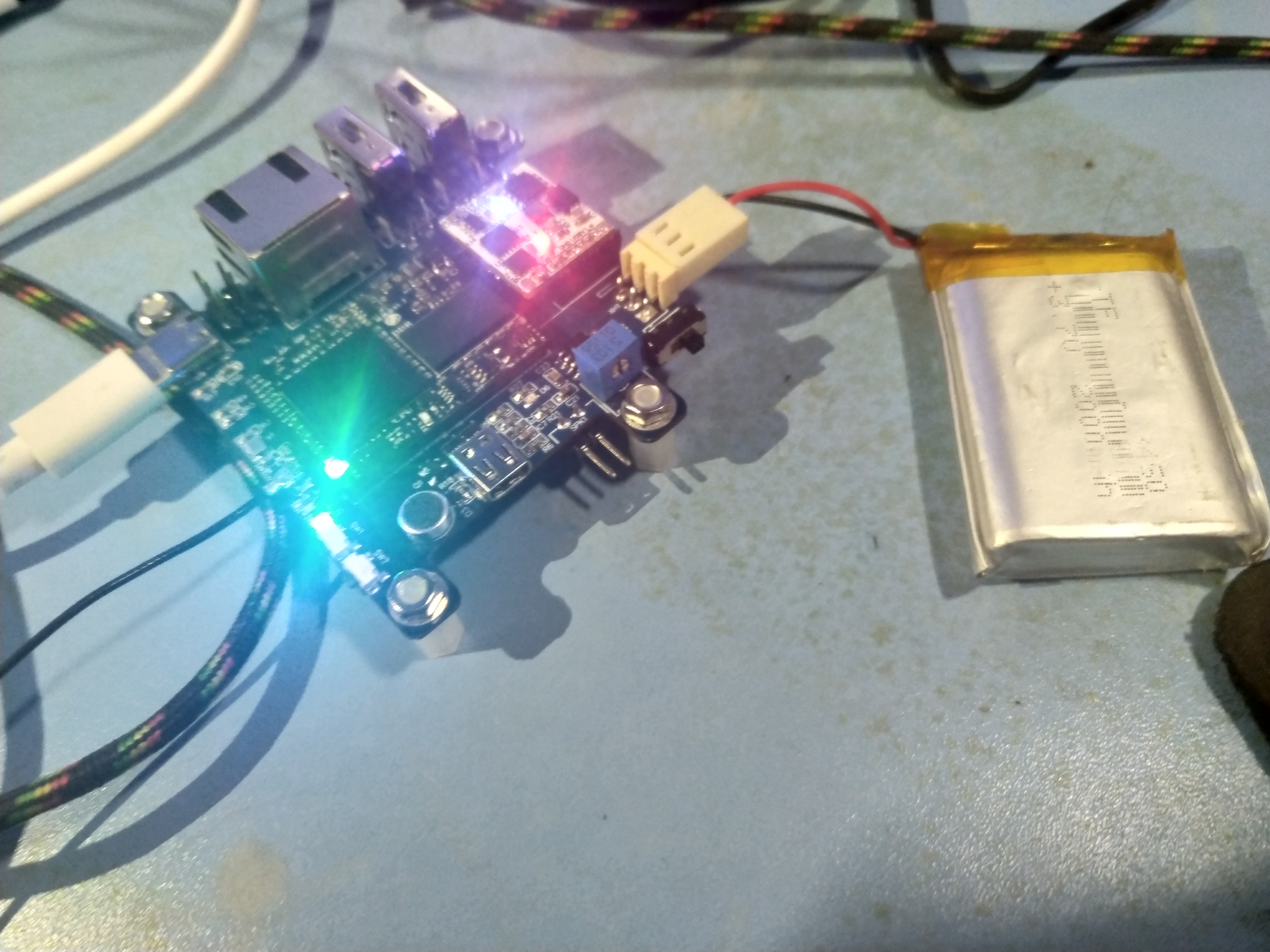
#61 全志 SOC » 分享SINLINX的V3S开发板LCD转接板工程 » 2020-07-01 17:55:50
- yangshuwei
- 回复: 10
LCD转接板(sinlinx).zip
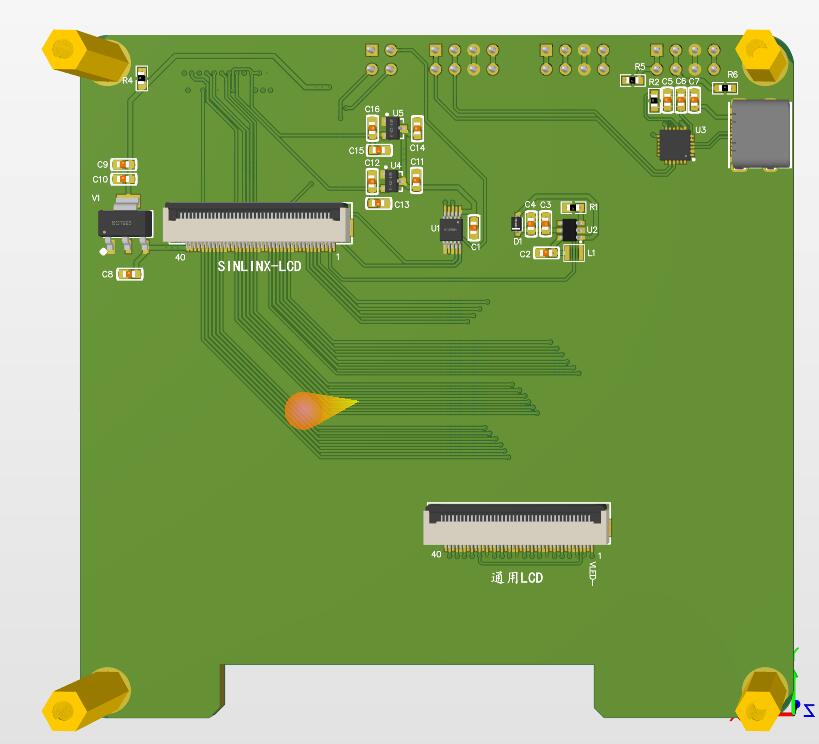
图便宜买了个芯灵思的v3s开发板,发现摄像头和LCD只能用他们家的。手头刚好有荔枝派的通用5寸屏,所以画了这么一个转接板
描述:
双层转接板,嘉立创5元打样
功能:
1、转换为通用LCD线序
2、引出DVP摄像头接口
3、typec+CP2105 USB转双串口
4、预留底板三路串口的插排接口
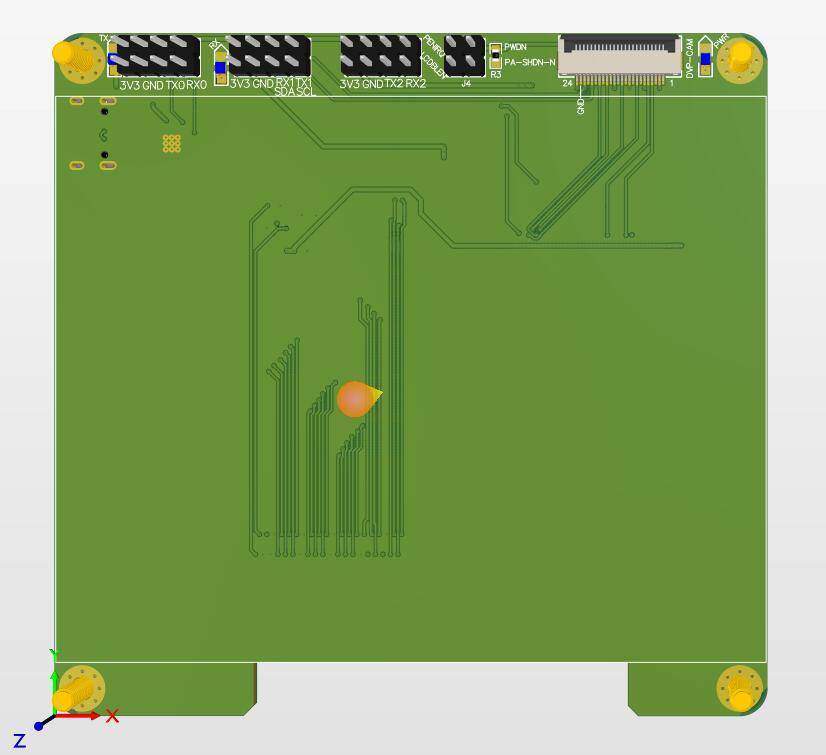
等老夫考完试,焊板验证
#62 Re: 全志 SOC » {水} 整好板子又整了两天固件,发一个 H3 KERNEL 5.7 (BIN) » 2020-06-17 11:23:04
everlink wrote:
大神你好,我的板子预留了emmc,但是没有焊.理由
1,感觉用不上这么大的空间
2,emmc贵,大神你比较有钱
3,TF 卡也挺好
哈哈 还好啦8G的好像36一片
#63 Re: 全志 SOC » {水} 整好板子又整了两天固件,发一个 H3 KERNEL 5.7 (BIN) » 2020-06-13 00:09:38
大佬,我的那个emmc好了,已经可以正常启动了。
#64 Re: 全志 SOC » {水} 整好板子又整了两天固件,发一个 H3 KERNEL 5.7 (BIN) » 2020-06-13 00:04:42
围观,板子很漂亮
六层的吗?复位那块咋飞线了
#65 Re: 全志 SOC » 分享H3核心板 底板 电源模块的工程文档 » 2020-05-28 07:48:58
qinxiongxu wrote:
哪里做的?这么便宜
华秋pcb
#66 Re: 全志 SOC » 分享H3核心板 底板 电源模块的工程文档 » 2020-05-27 08:36:50
linghaibin wrote:
不错 6层板打样多少钱
1180
#67 Re: 全志 SOC » 本站网友 @rongwinzip 计划众筹一款X3开发板,大家有什么建议吗,欢迎跟帖 » 2020-05-26 19:32:45
rongwinzip wrote:
目前测试X3上AWTK跑的十分欢快,可能是个做HMI的好选择。
买买买
#68 Re: 全志 SOC » 自己画了一个全志H3 H5核心板 24X32mm BTB连接器 » 2020-05-26 19:26:54
linghaibin wrote:
这个电源模块支持 边充电 边用么
支持
#69 Re: 全志 SOC » DIY一块全志V3S的学习板,尽量引出所有功能(感谢晕哥支持) » 2020-05-25 23:54:03
wonrowl wrote:
v3s已经飞升,上香吧,诸位
泪目
#70 Re: 全志 SOC » 分享H3核心板 底板 电源模块的工程文档 » 2020-05-25 11:13:37
顶一下
#71 Re: 全志 SOC » 分享H3核心板 底板 电源模块的工程文档 » 2020-05-24 22:10:52
上面的问题已经解决了
解决方法 在ubuntu下拷贝boot.cmd文件到一个单独的文件夹
使用mkimage命令 生成boot.scr
mkimage -C none -A arm -T script -d boot.cmd boot.scr
mkimage在uboot的tools目录下
之前我一直是在ubuntu下新建boot.scr文件,这样不行的
必须使用mkimage做一下转换
至此路子都通了
接下来就是驱动和应用程序了
#72 Re: 全志 SOC » 分享H3核心板 底板 电源模块的工程文档 » 2020-05-24 21:16:47
lzr325 wrote:
感谢大佬的分享,自己正想设计一个H3的板子玩玩,画玩了一直没有打板
加油 不懂得问我
#73 Re: 全志 SOC » 分享H3核心板 底板 电源模块的工程文档 » 2020-05-24 18:50:56
everlink wrote:
另外,BTB启动失败,,你试一下在核心板上的 DCDC VIN 锻加一个100uf点解电容到地看有没有改善
好的 只是接触不良 哈哈
我今天自己编译了uboot 内核 和根文件系统
uboot引导内核的时候
Executing script at 43100000
Wrong image format for "source" command
出现这个信息 然后自动退出 怎么boot都不能启动
我的操作如下
ls /dev/sd*
就可以看到插入的SD卡在哪。很大程度就是在sdb
sudo umount /dev/sdb # 若自动挂载了TF设备,请先卸载
接着,如果有多个分区的话,如sdb1,sdb2之类的,就先把分区删除了,删除之前记得要umount:
sudo fdisk /dev/sdb
按m查看选项,按d删除分区。看提示操作即可
删除完分区之后,按n添加分区
按p添加主分区
选择分区1
输入20480,表示从在SD卡的头部留出20480个块。留给uboot使用,第一个分区从20480开始分
接着输入61440,代表结束在61440,就意味着分区1大小为(61440-20480)块大小
接着再来一遍,按n添加分区
按p添加主分区
选择分区2
输入61441,紧跟分区1后面
按回车,默认即可
最后,按w。保存退出
sudo mkfs.vfat -F 32 -I /dev/sdc1将分区1格式化为fat32格式
sudo mkfs.ext4 /dev/sdc2 格式化为ext4分区
最后更新uboot:
ysw@ubuntu:~/H3/uboot/u-boot$ sudo dd if=u-boot-sunxi-with-spl.bin of=/dev/sdb bs=1024 seek=8
这样我们编译好的uboot就会更新到SD卡的头部上。
接着更新Linux,当然,你得先编译好Linux:
直接我们给SD卡分区了,现在得mount上
sudo mount -t vfat /dev/sdc1 /media/ysw/boot
我们就在/mnt目录下挂载了分区1,再把Linux内核和设备树文件复制过来即可:
cp arch/arm/boot/zImage /mnt
cp arch/arm/boot/dts/sun8i-h3-nanopi-neo-core.dtb /media/ysw/rootfs
然后把根文件系统放到分区2
插tf启动 就卡到那个上面了
boot.scr文件
mkimage -C none -A arm -T script -d boot.cmd boot.scr
setenv fsck.repair yes
setenv ramdisk rootfs.cpio.gz
setenv kernel zImage
setenv env_addr 0x45000000
setenv kernel_addr 0x46000000
setenv ramdisk_addr 0x47000000
setenv dtb_addr 0x48000000
fatload mmc 0 ${kernel_addr} ${kernel}
fatload mmc 0 ${ramdisk_addr} ${ramdisk}
fatload mmc 0 ${dtb_addr} sun8i-${cpu}-${board}.dtb
fdt addr ${dtb_addr}
setup MAC address
fdt set ethernet0 local-mac-address ${mac_node}
setup XR819 MAC address
if test $board = nanopi-duo; then fdt set xr819 local-mac-address ${wifi_mac_node}; fi
setup boot_device
fdt set mmc${boot_mmc} boot_device <1>
setenv fbcon map:0
setenv bootargs console=ttyS0,115200 earlyprintk root=/dev/mmcblk0p2 rootfstype=ext4 rw rootwait fsck.repair=${fsck.repair} panic=10 ${extra} fbcon=${fbcon}
bootz ${kernel_addr} ${ramdisk_addr}:500000 ${dtb_addr}
————————————————
版权声明:本文为CSDN博主「风筝丶」的原创文章,遵循CC 4.0 BY-SA版权协议,转载请附上原文出处链接及本声明。
原文链接:https://blog.csdn.net/guet_kite/java/article/details/79671598
#74 Re: 全志 SOC » 分享H3核心板 底板 电源模块的工程文档 » 2020-05-24 09:53:01
yangshuwei wrote:
你下载我发的文件 里面有封装 阻焊我好像设置的4mil
我的emmc 这一版不打算焊接了 完了重新焊一块板子
因为BTB的装配误差 导致经常启动失败
还有个问题 如果我想烧写nanopi neo air的系统 我该怎么修改BOARD的信息呢
我昨天试了 不管烧写哪个系统 自动识别的一直是nanopi neo core
#75 Re: 全志 SOC » 分享H3核心板 底板 电源模块的工程文档 » 2020-05-24 09:50:05
everlink wrote:
楼主的EMMC调好了没,我头一块H3板子只放了spi flash,打算把emmc放回去在做一块板子,emmc焊盘间距好细。。。不知道阻焊间隙要做多大比较好。。
你下载我发的文件 里面有封装 阻焊我好像设置的4mil
#76 Re: DIY/综合/Arduino/写字机/3D打印机/智能小车/平衡车/四轴飞行/MQTT/物联网 » [准备发车]@bunny带我们玩入门级方波无感BLDC,提供 schematic & gerber,QQ群:807712443 [已售罄] » 2020-05-23 14:04:40
你只管发动起步加速,我已经上车
#77 Re: 全志 SOC » 分享H3核心板 底板 电源模块的工程文档 » 2020-05-22 22:27:57
sy373466062 wrote:
后续进展如何了? DDR速度提上去了吗?
要稳定的话 ddr到600左右 再高出问题
就是走线的问题 估计干扰比较严重
#78 Re: 全志 SOC » 分享H3核心板 底板 电源模块的工程文档 » 2020-05-22 17:25:12
everlink wrote:
酷
多谢大佬指点迷津 一起进步
#79 Re: 全志 SOC » 分享H3核心板 底板 电源模块的工程文档 » 2020-05-22 17:00:48
gzhssl wrote:
恭喜楼主,坚持不懈值得学习
谢谢支持
#80 Re: 全志 SOC » 分享H3核心板 底板 电源模块的工程文档 » 2020-05-22 17:00:00
Timaker wrote:
找人代焊接行不行
可以的 不过我打算买返修焊台了
#81 Re: 全志 SOC » 分享H3核心板 底板 电源模块的工程文档 » 2020-05-22 06:33:55
也就是说原理图 pcb方案是可行的了。。。但是也许不太专业。。。
#82 Re: 全志 SOC » 分享H3核心板 底板 电源模块的工程文档 » 2020-05-22 06:32:54
everlink wrote:
对,用 nanopi neo core 镜像
大佬 系统启动成功了
默认设备 nanopi neo core
#83 Re: 全志 SOC » 分享H3核心板 底板 电源模块的工程文档 » 2020-05-21 21:36:57
IC爬虫 wrote:
你可以搞个铝加热台,大概也就一百来块钱,加热台设置一百多度,板子器件摆好后在加热太上预热一会,再热风枪吹一会就好了
嗯嗯 我有钱了试试
#84 Re: 全志 SOC » 分享H3核心板 底板 电源模块的工程文档 » 2020-05-21 09:45:23
everlink wrote:
DDR 走线是4mil?
---
我按照我自己的经验(强调一下可能不是对的,或者最对的,我新手)是:
尽量不要风枪对着纸盒,火灾不怕吗。。。。。。焊BGA时板子底下最好有些温度,淘宝找 BGA返修加热台,本人是用水泥电阻DIY了一块加热板(成本5块钱+电阻)
你背面有零件,考虑贴些隔热胶带,然后放到加热的 xx 上如果没有加热台/板。考虑放个小的铁板,铝板。风枪把铝板加热。如果这个都没有,建议用几个硬币拼起来当铁板用。
温度:100度就够,所以你可以用一杯开水,上面放一块PCB盖着杯口。PCB有洞的话用透明胶封一下,预热几十度比常温还是强ALL IN ALL:吹焊前加热整块板子100度~150度为好
空间实在有限 4mil已经接近极限了(我觉得可以尝试下4.5MIL 其实我也是新手。。。) 我完了找一块铝板试试 受教了 老铁
#85 Re: 全志 SOC » 分享H3核心板 底板 电源模块的工程文档 » 2020-05-21 08:24:16
芯片一直虚焊的原因,我想是因为我调的风枪的风速是最低,风速大一点相当于压芯片了,能保证较好的焊接效果
#86 Re: 全志 SOC » 分享H3核心板 底板 电源模块的工程文档 » 2020-05-21 08:21:26
3、DDR的焊接调试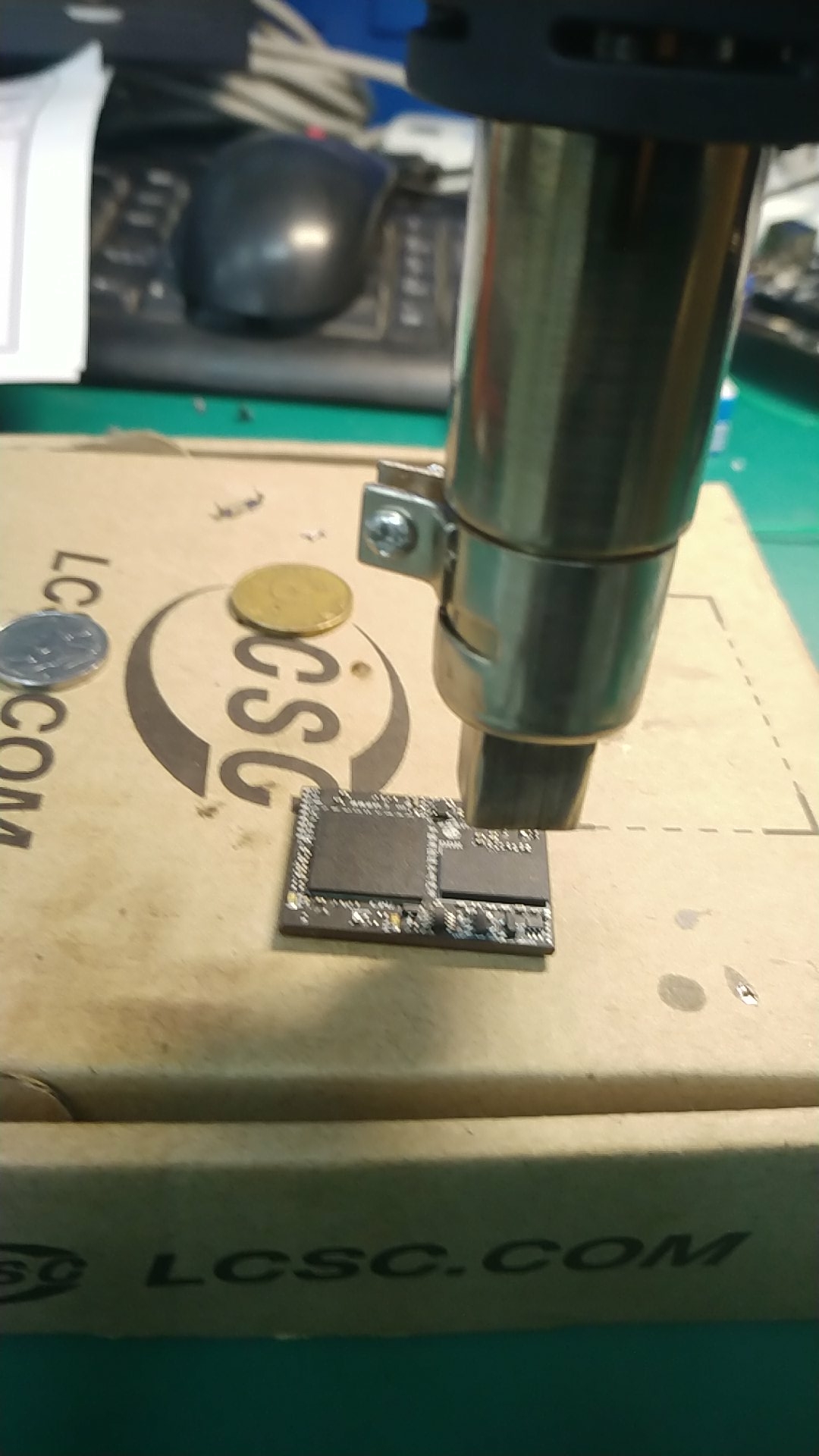
CPU fel起来后,就开始焊接DDR,每次都起翘,应该是温度不均匀,风枪风速最小的原因,调整后焊接,上电做了测试,用了DragonHD硬件测试工具测试DDR,每次DRAM都初始化失败,在我走投无路之时,大佬们闪耀着人性的光辉,无私的帮助了我,原来是CPU的DDR部分没有焊接好。。。。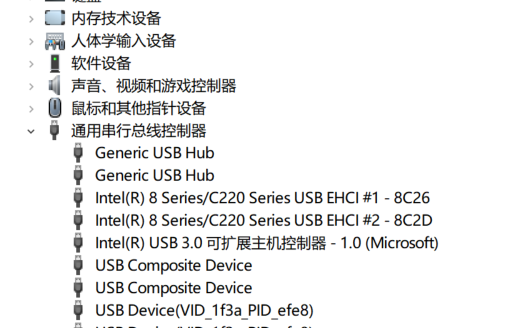
我再次操(cao 一声)起风枪,愤怒的锤着CPU,当温度下降到0后,我内心忐忑。。。。
再次上电,上测试软件 时钟频率选择216 点击启动,但是软件没反应,我尝试着按了复位键,启动成功,软件开始测试DDR,并且检测到DDR为512M
后面做压力测试,我等了好长时间,最后停止,选择了时钟频率552,一把测试通过。
接着我再调整时钟频率为792,做了一次测试,发现有时能成功,错误原因要么是压力测试失败,要么就是dma test失败。
我怀疑是PCB走线的问题和温度太高导致的不稳定。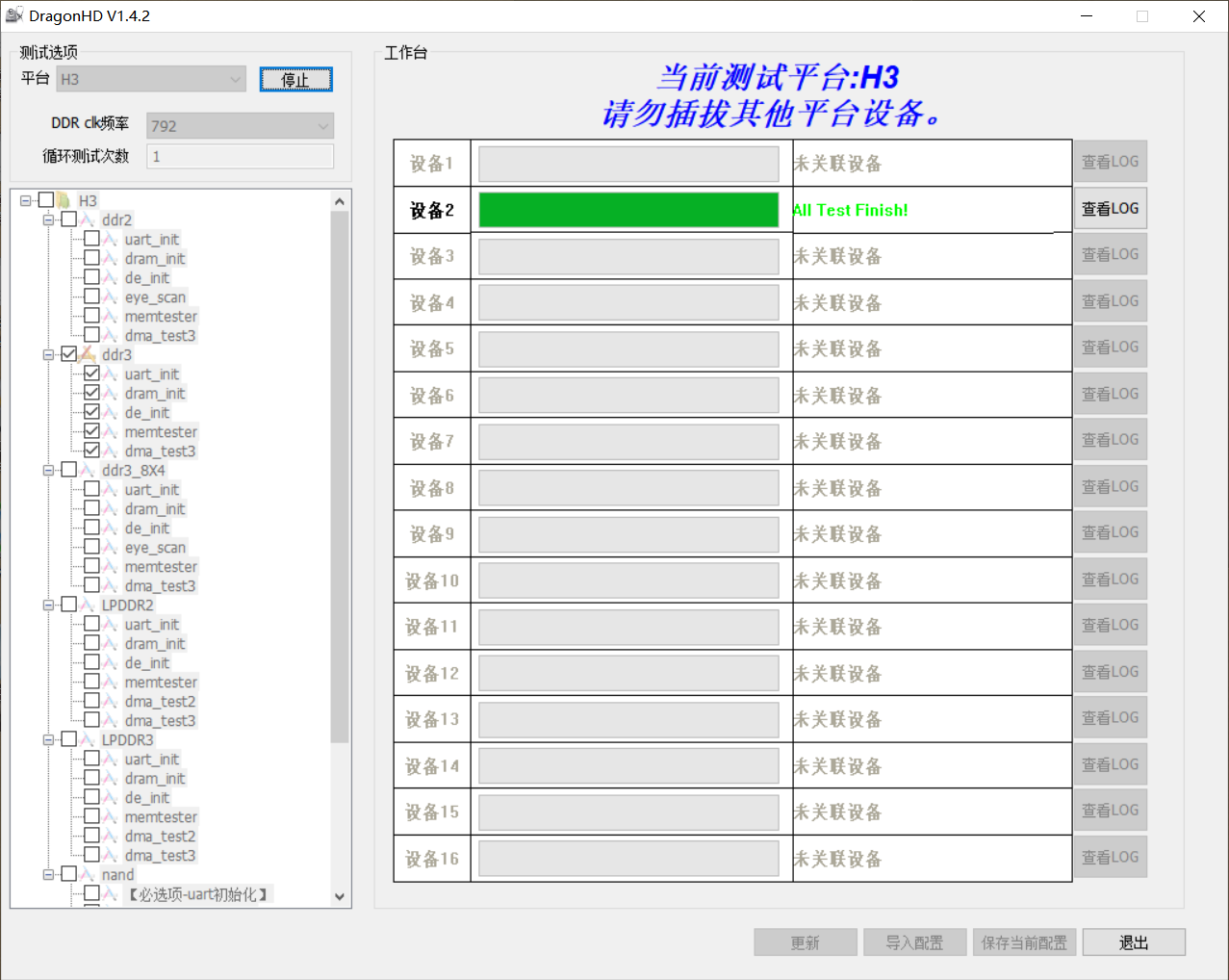
我DDR走线不规范是因为板子实在太小 走线/线宽=4mil 蛇形等长间距4mil 内外层铜皮都是1OZ
下面是DDR走线图片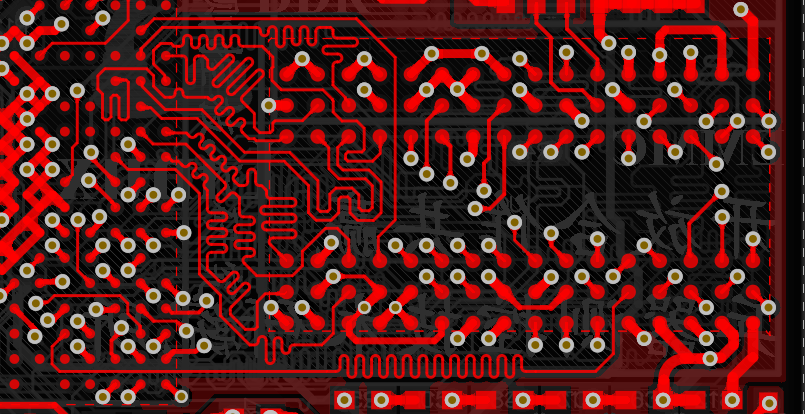
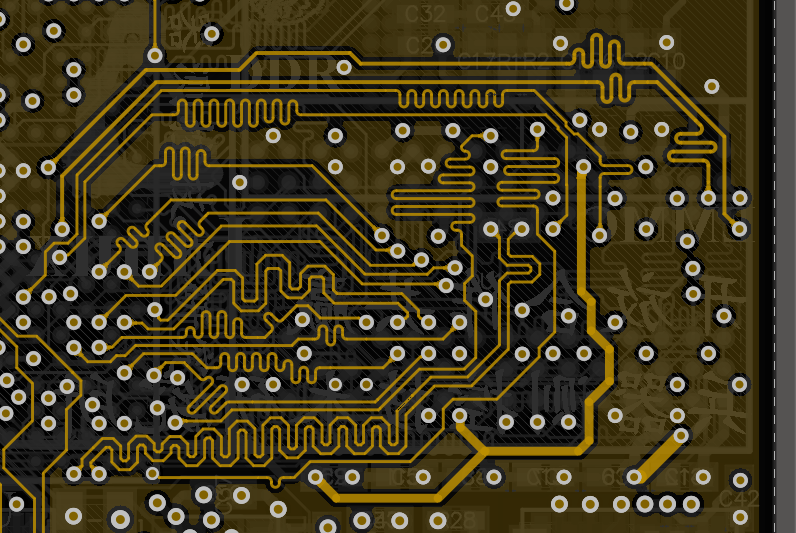
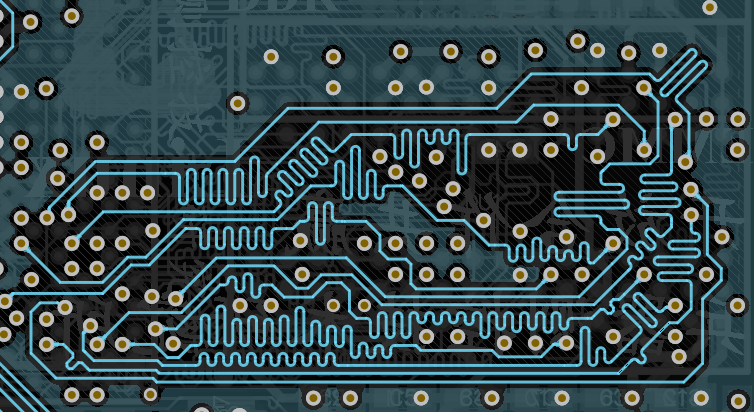
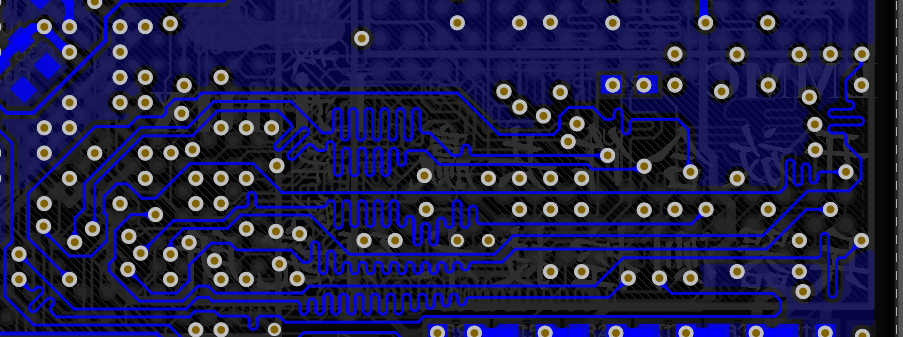
至此CPU和DDR都跑起来了,接下来准备按照everlink的建议,烧写nanopi neo core的镜像看看能不能跑起来
如果能跑起来,抽空准备再把8G的emmc焊上
-----------------------未完待续--------------------
#87 Re: 全志 SOC » 分享H3核心板 底板 电源模块的工程文档 » 2020-05-20 23:39:55
everlink wrote:
对,用 nanopi neo core 镜像
好的 明天我再试试 之前应该是ddr有问题 插上没用 现在应该可以了
#88 Re: 全志 SOC » 分享H3核心板 底板 电源模块的工程文档 » 2020-05-20 23:39:18
yangshuwei wrote:
我是软件小白 哈哈哈还
我其实把烧写好nanopi的h3的镜像烧写好了
用它的插上不启动。。。。。串口没任何消息
#89 Re: 全志 SOC » 分享H3核心板 底板 电源模块的工程文档 » 2020-05-20 23:34:59
yangshuwei wrote:
我直接用的nanopi的镜像 这样可以吗? 还是要自己做uboot
我是软件小白 哈哈哈还
#90 Re: 全志 SOC » 分享H3核心板 底板 电源模块的工程文档 » 2020-05-20 23:32:18
everlink wrote:
你已经跑到 OTG 能识别的程度就不需要电流表了,芯片一定在跑。按照我当时步骤,到你更新的这一步时我会上好DDR后挂个SD卡,然后串口看LOG
我直接用的nanopi的镜像 这样可以吗? 还是要自己做uboot
#91 Re: 全志 SOC » 分享H3核心板 底板 电源模块的工程文档 » 2020-05-20 23:21:27
everlink wrote:
楼主需要洗板水。。。。 酒精,有时。。真的需要洗板水
我没有做钢网,300度2挡风吹USB电流表对我帮助也挺大,我是用电流表的曲线跳不跳来判断芯片有没有跑
电源也挺重要,跑起来后不久就挂的话,考虑放些电容
以上应该不是最对的,只是我当时调板的体会。对这样的板子,我是新手。。
楼主这套板子,我自己的感觉是 BTB 可能是一个隐患。一套用几个 BTB,生产时不拍对位的公差吗,自己贴就更是问题了
确实是,btb要考虑装配公差,一般我都是风枪吹来移动对位。
我得买个USB电流表了,老兄联系方式有吗?以后可以多多交流 我qq1272910026
#92 Re: 全志 SOC » 分享H3核心板 底板 电源模块的工程文档 » 2020-05-20 22:31:02
2、在毁灭性的打击下,我并没有放弃,重新贴了三片空板,仅仅焊接了小的元器件,留下BGA位置
意识到不能使用回流焊机焊BGA,我就重新操起风枪,使劲发泄自己的情绪,最终焊接完成CPU,上电发现PWR指示灯不亮,我心里一阵刺痛,难道就要这样结束了吗,不。上一版虽然死的好惨,但是人家电源都没问题,晶振也起振了,所以问题究竟出在哪里了,我又开始徘徊。在我走投无路的时候,晕哥驾着七彩祥云来到我的世界,并把我带进了海景别墅。别墅里面人才辈出,大家争先恐后的讨论各种技术问题,这辈子也没感受到这么好的氛围。在这种氛围熏陶下,我认识了好多良师益友
同别墅里的大佬们交流了自己遇到的问题,周正大佬指示:风枪280,先吹边缘,然后绕着芯片转着圈吹。吹完也别马上断,180吹会儿,100吹会儿,再停。
按照这种操作,我焊接好了CPU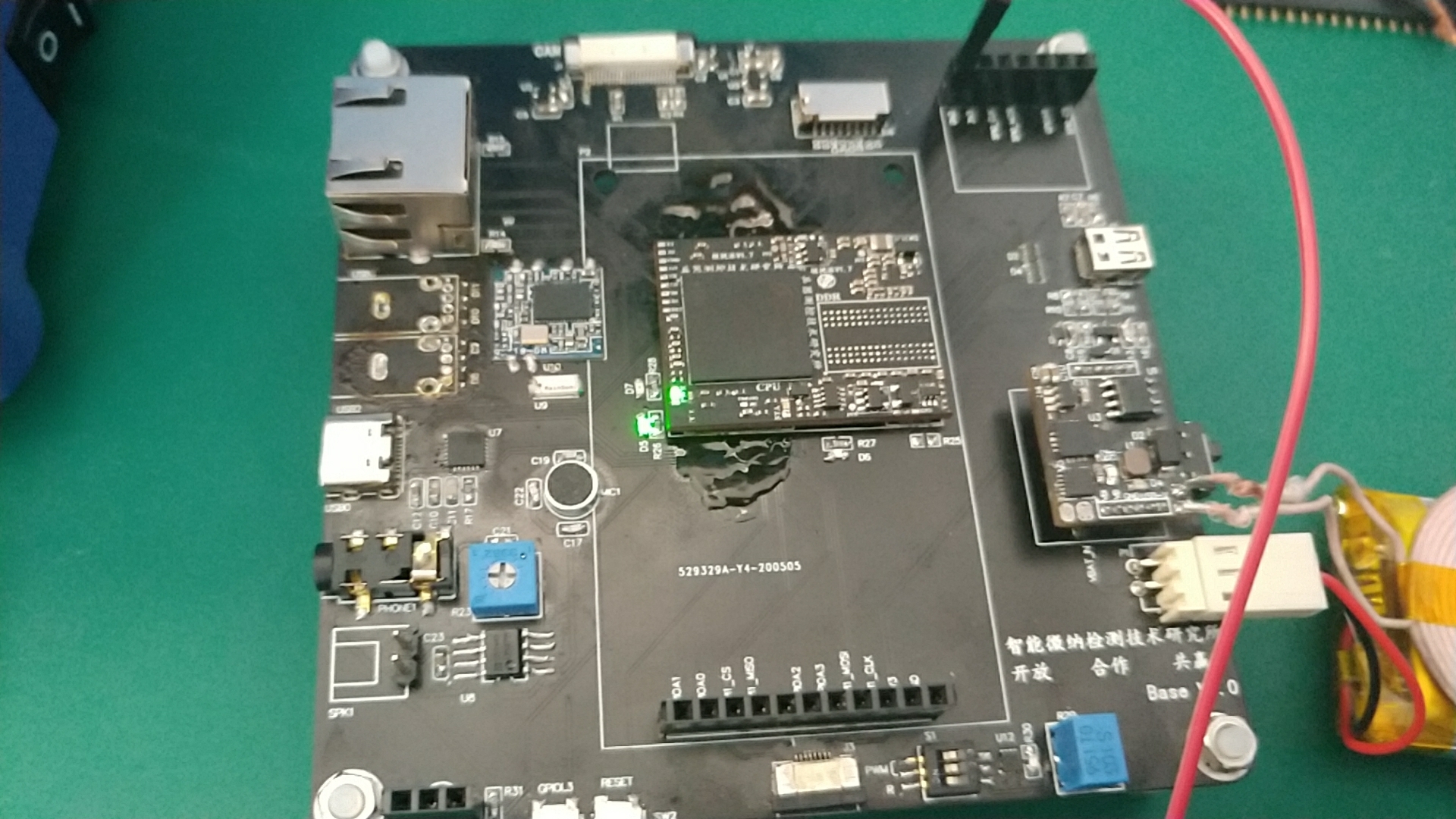
之后测量了1V2 1V3 1V5 3V3的电压以及24MHZ晶振波形 32.768KHZ晶振波形,均成功
插上USB-OTG 电脑识别全志H3 我的内心狂舒一口气,一颗悬在头上的石头没掉下来,让我倍感轻松
-------------------明天接着更-------------------------
#93 Re: 全志 SOC » 分享H3核心板 底板 电源模块的工程文档 » 2020-05-20 22:17:00
经过几天的焊接调试,现在分享过程中的一些问题、经验和教训
1、全志H3的焊接历程
第一版焊接的板子没有做任何测试,直接把CPU、DDR、EMMC全都焊上了,后面接USB_OTG电源正常,电脑不识别H3,我瞬间就慌了,经过楼上大佬的指示,我先是去掉emmc,发现还是不行
至此,我就在没焊接好、走线有问题、原理图不对、板厂工艺问题之间徘徊,好生痛苦。经过大佬提示,打算重新做一下焊接,但是大佬说BGA焊接难度高,我自己心里又慌,所以去了淘宝,找了一家 帮人焊接的店,后面和店家的交流中,我了解到回流焊机可以焊接BGA,而且温度要265度。刚好前几天买了一个999的回流焊机,心中窃喜。于是第二天早早起床,准备奇迹再现。
我至今还记得他童真的样子如下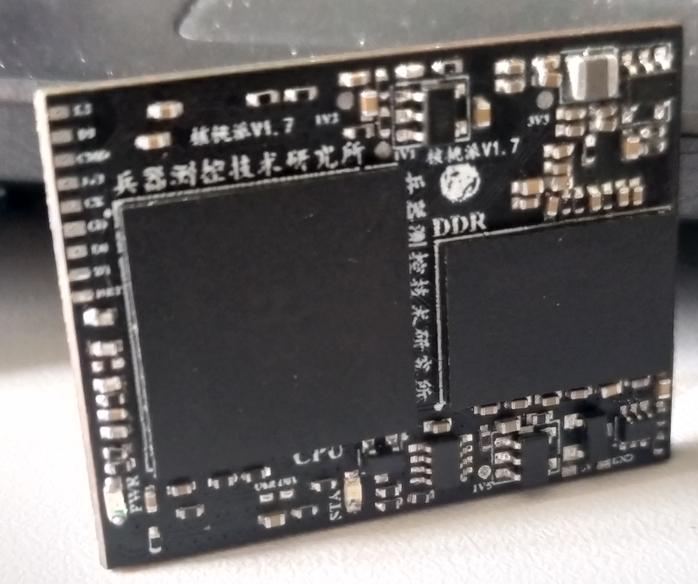
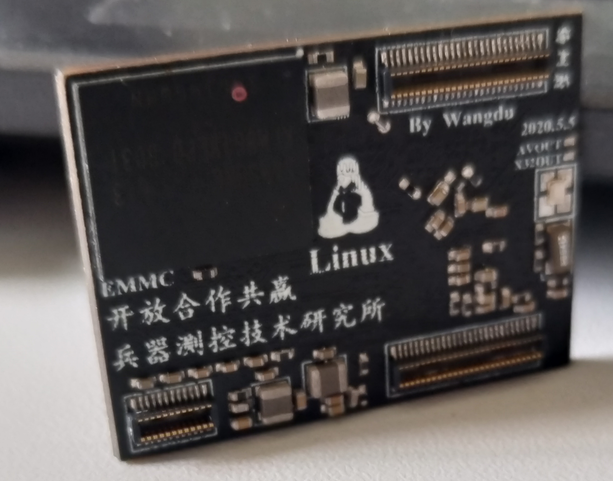
第二到了实验室,先自己设定了温度曲线140(60s)->180(60s)->265(3s)->200(30s)->170(60)->100(0)
放入板子,静候佳音,不一会就焊接完成了如下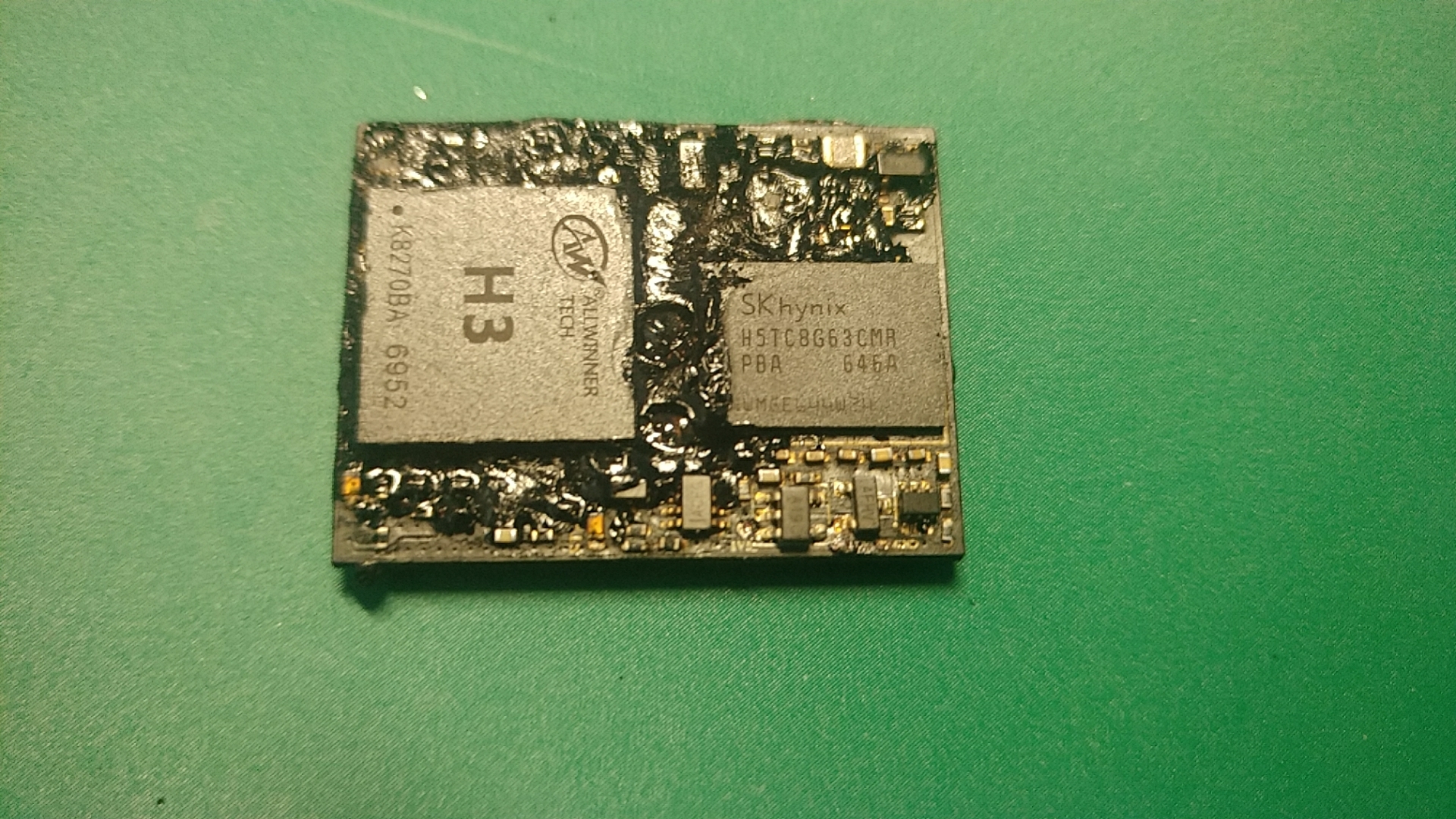
真是难以想象,板子中间起了个大包,流出来黏黏的黑色液体,已经凝固。回想起来自己曾经对板子的种种蹂躏。内心感触良多。
卸下BGA和DDR后发现表层已经不忍直视,之前对板子的操作如下
正面钢网刷中温锡膏->贴正面元器件->回流焊机焊接->背面钢网刷低温锡膏->贴背面元器件->回流焊机焊接->使用助焊剂风枪焊接BGA,DDR,EMMC->
使用松香处理背面BTB连接器的连锡问题->使用95酒精和牙刷刷板,板子直接泡到酒精中清洗->回流焊机焊接cpu和DDR->然后出现上面情况了
初步怀疑是酒精、助焊剂浸透PCB内层,高温挥发、致使铜皮鼓起、内层粘合胶融化,从过孔冒出,直接酿成惨剧,如有不同看法,请指正
#94 Re: 全志 SOC » 分享H3核心板 底板 电源模块的工程文档 » 2020-05-20 21:52:29
everlink wrote:
楼主有进展吗,
不久前我才调过H3,我是嘉立创打的板子。
我的经验是阻焊剂和风枪调好了我的板子。我是第一次焊接0.65 的BGA
复位我用的是100K+1UF
有进展 马上更新 分享操作
#95 Re: 全志 SOC » 分享H3核心板 底板 电源模块的工程文档 » 2020-05-17 12:31:42
哇酷小二 wrote:
以下是@adozip大神回复:
fel能不能起来和dram没关系,其实就可以排除很多东西了
第一,CPU的RST信号对不对,是不是一直拉着CPU不让启动
第二,是不是丢电源了,比如-打成_这样,我犯过好几次这种错误
第三,手抖了吧,BGA手贴对功夫要求很高的。
还有reset啊,我看直接就一个电阻到VCC,有没有上电时序要求?
感谢@adozip 我先按照这个逐步排查
#96 Re: 全志 SOC » 分享H3核心板 底板 电源模块的工程文档 » 2020-05-17 12:00:35
#97 Re: 全志 SOC » 分享H3核心板 底板 电源模块的工程文档 » 2020-05-17 11:04:37
everlink wrote:
拿掉emmc,观察上电过程中TF卡pin脚的波形
没有波的话建议先看ddr最后再去怀疑板厂
好的 我试试
#98 Re: 全志 SOC » 分享H3核心板 底板 电源模块的工程文档 » 2020-05-17 10:48:15
everlink wrote:
Errr
貌似重新定义了分享
其实应该先把资料给大家来看看 最后根据大家意见再画PCB
唉 后面得改改了
#99 Re: 全志 SOC » 分享H3核心板 底板 电源模块的工程文档 » 2020-05-17 10:47:04
我看了全志H3的硬件调试指南
H3 HOMLET Hardware debugging guide V1_0 20141113.pdf
他说SD卡的DATA3和 CLK用作串口通信了。。。而且我实测DATA3是高电平 CLK低电平 这个tf卡感觉不是用启动的。。。不知道怎么调到串口0上去。。。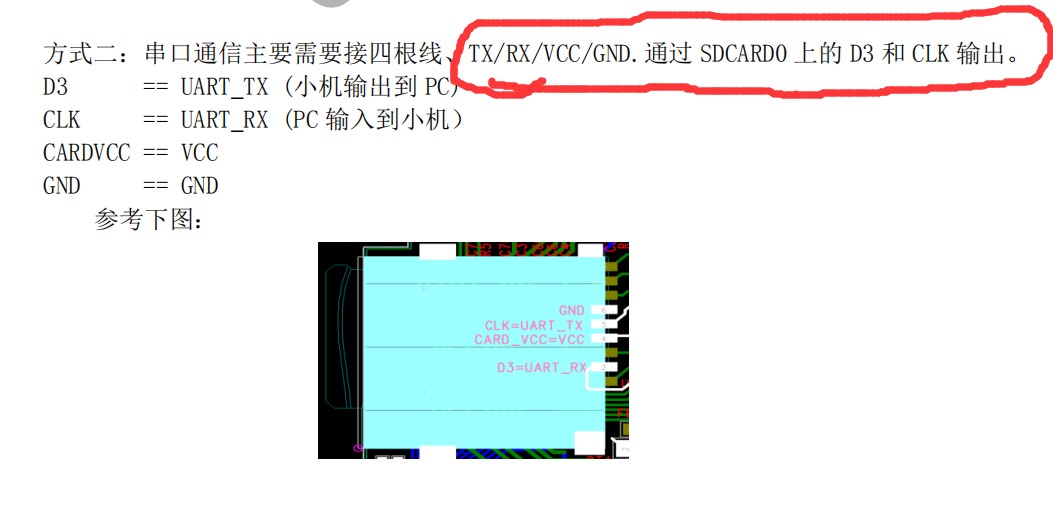
#100 Re: 全志 SOC » 分享H3核心板 底板 电源模块的工程文档 » 2020-05-17 10:18:17
andrewgu wrote:
晶振起来了吗?
示波器测到24MHZ晶振起振了 但是32.768KHZ的晶振 没起振
芯片电源电压都是正常的 温度也正常
最大的问题是 tf卡的8个管脚 除了DATA3和3V3是3.3V 其他都是0V
tf卡的使能管脚CMD也是低电平 但是emmc的CMD是高电平
nanopi neo core 的配置 512M+8G
我这个配置是 1G+8G
我在想是不是换个512M的DDR就可以用友善的固件启动了
#101 Re: 全志 SOC » 分享H3核心板 底板 电源模块的工程文档 » 2020-05-16 23:28:25
湘楚浪子 wrote:
这得有板子才能找问题,看看哪里短路了,华强的工艺不保险¨
已经求助晕哥了 我明天再排查排查
打算拆掉emmc 然后看看板子什么反应
能不能从tf卡启动。。。。
#102 Re: 全志 SOC » 分享H3核心板 底板 电源模块的工程文档 » 2020-05-16 23:27:32
有梦的地方 wrote:
可以进 usb fel吗?就是usb烧录那个
进不了 我还专门检查了USB0P和USB0N和OTGID 没错呢。。。。明儿接着检查吧
#103 全志 SOC » 分享H3核心板 底板 电源模块的工程文档 » 2020-05-16 21:54:47
- yangshuwei
- 回复: 64
画的板子 启动不了了 后面边学边搞吧
tf卡插上CMD一直是0V emmc的CMD一直是3.3V
怀疑系统从emmc启动 可是里面没系统 估计是电路哪块有问题
我再慢慢排查吧
下面是文件 直接下载即可
share.zip
#104 Re: 全志 SOC » 上次预告的全志H3核心板焊接完成了 » 2020-05-16 15:30:12
老铁们 这种新画的板子 第一次该怎么启动呀。。。。。支支招呗
#105 Re: 全志 SOC » 上次预告的全志H3核心板焊接完成了 » 2020-05-16 13:33:01
rongwinzip wrote:
无线充电这么溜
嘿嘿 无线充电 烂大街了。。。淘宝买个模块就能用
#106 Re: 全志 SOC » 上次预告的全志H3核心板焊接完成了 » 2020-05-16 13:32:30
Gentlepig wrote:
最后一张图里的蚊香状的东西是什么?
看到了,无线充电。
天线叠在电池上,无线充电时会对电池有影响不?
暂时没啥影响 使用隔磁片会导致 发射端芯片发热严重 所以就不用隔磁片了
#107 Re: 全志 SOC » 上次预告的全志H3核心板焊接完成了 » 2020-05-16 13:31:31
我要凉了
用的nanopi neo core的IMG 上电状态指示灯不亮
测量tf卡CMD电压是0V 但我确实拉高了
然后又测量了emmc的CMD电压 是3.3V
测试电源电压均正常
敢问各位技术大佬
从tf卡启动 需要做哪些处理呢
#108 Re: 全志 SOC » 上次预告的全志H3核心板焊接完成了 » 2020-05-16 13:28:33
zhjerry wrote:
H3的确是非常好的东西但是市场上H3很多了, 除了大量的机顶盒商品,orangepi, nanopi 都有各种型号的小板或模块, 淘宝上还有一家卖98块的核心板含256MB内存和4GB的EMMC,无法超越的性价比。楼主做这个纯属兴趣吗?
兴趣使然
#109 全志 SOC » 上次预告的全志H3核心板焊接完成了 » 2020-05-16 11:32:20
- yangshuwei
- 回复: 19
核心板渲染图
6层 24mmX32mm 引出100Pin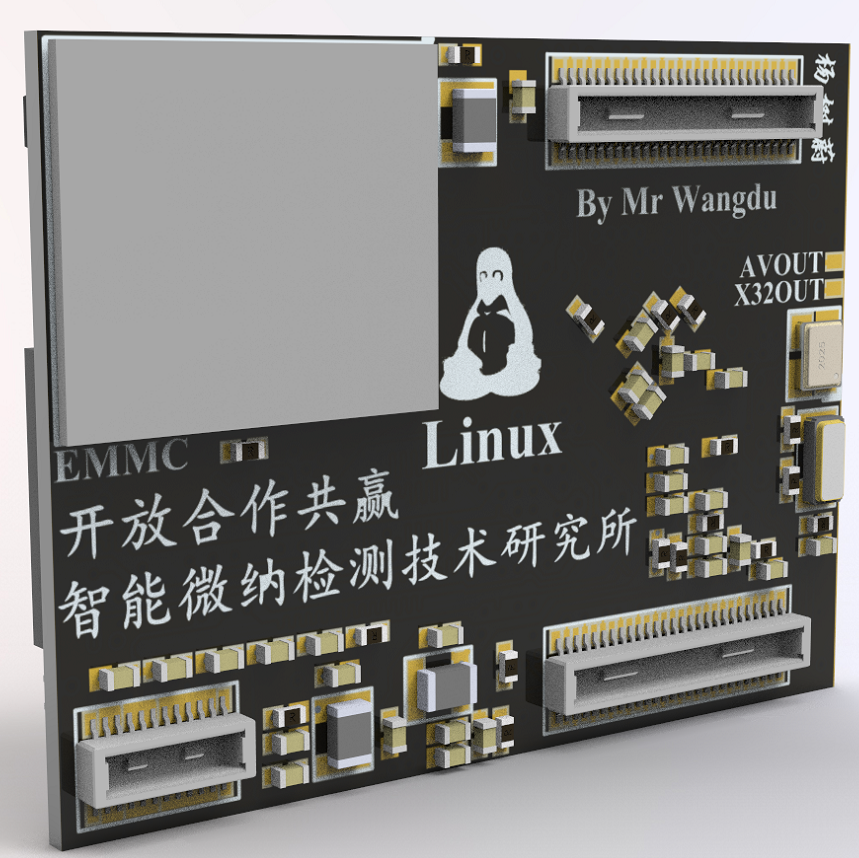
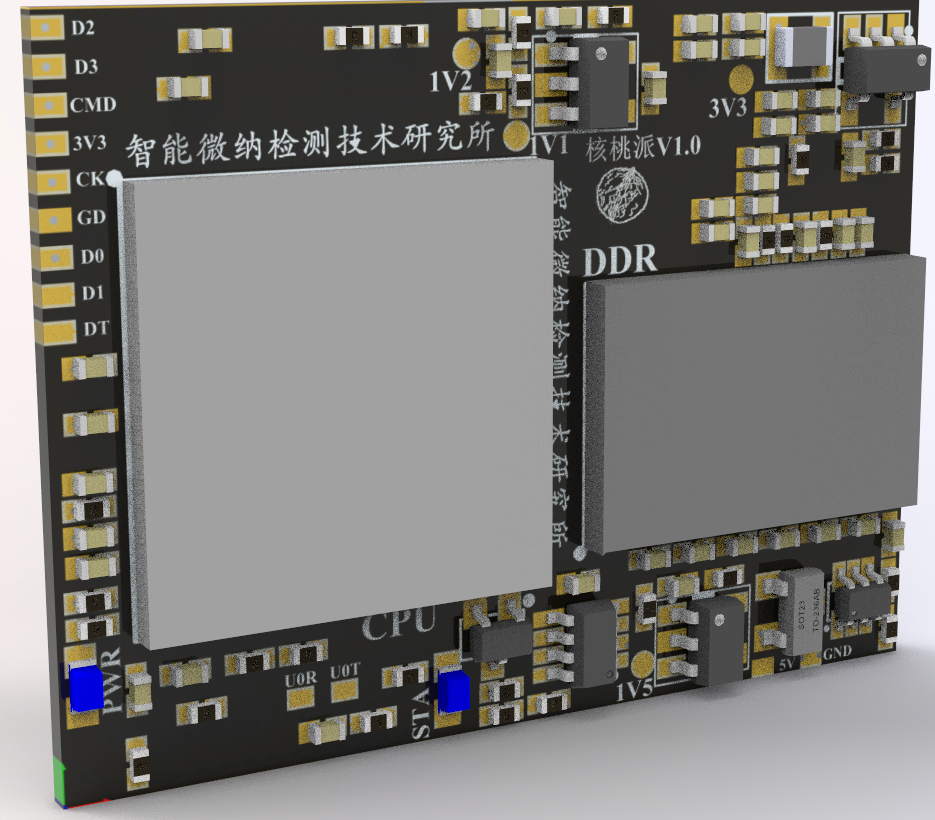
焊接完成
下面是硬件调试遇到的一些问题
1、使用回流焊机焊接BGA 出现虚焊,后续了解到BGA焊接需要轻压芯片,风枪重新焊接后,3V3、1V2、1V5、5V均正常
2、24M晶振问题:H3虚焊导致晶振不起振,重新焊接后输出24MHZ 正常
3、32.768KHZ晶振不起振,晶振输出管脚电压0V 目前仍未解决
4、电容电阻离得太近导致连锡短路,已解决
下面是测试底板
底板上的电源模块支持锂电池管理、升压5V、降压3.3V,和5V/1.5A的无线充电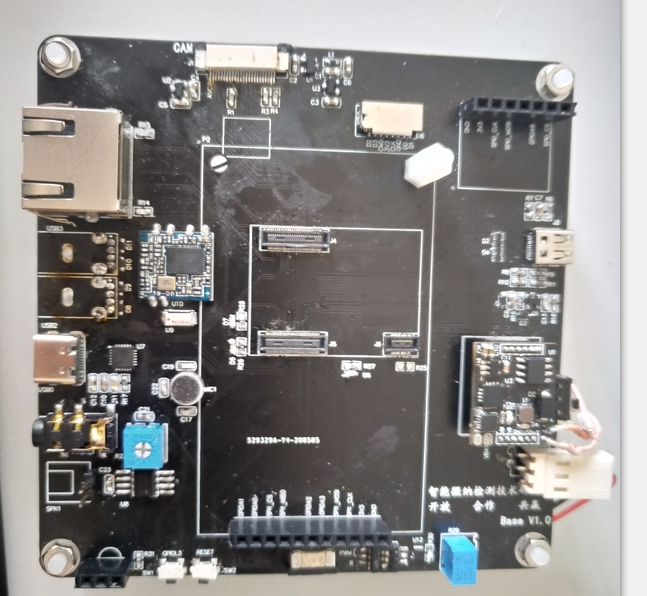
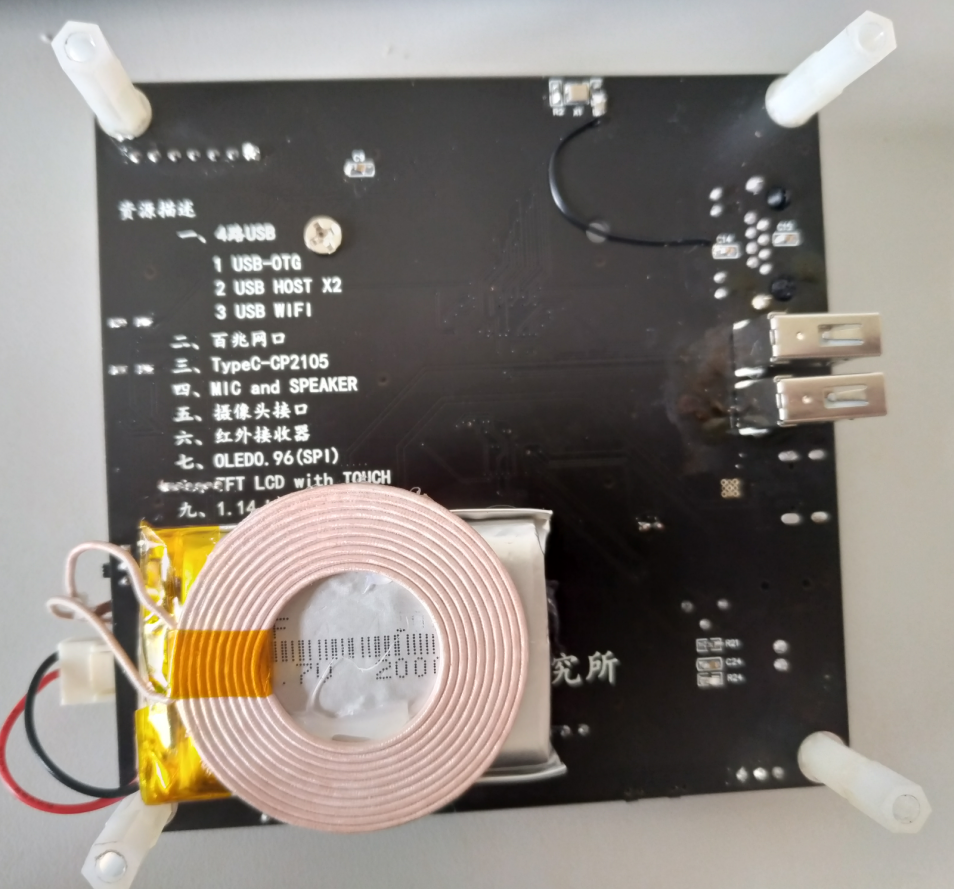
等我写完作业 就弄软件 先用友善的nanopi neo core的固件启动
要是可以正常启动了 就给大家分享一下
要是GG了 也分享给大家 一起找找问题
主要是怕这玩意不能用 凉了大家的心
#110 Re: 全志 SOC » 自己画了一个全志H3 H5核心板 24X32mm BTB连接器 » 2020-05-09 12:55:55
everlink wrote:
请教最上面的 CAM 是怎么接 H3 的?
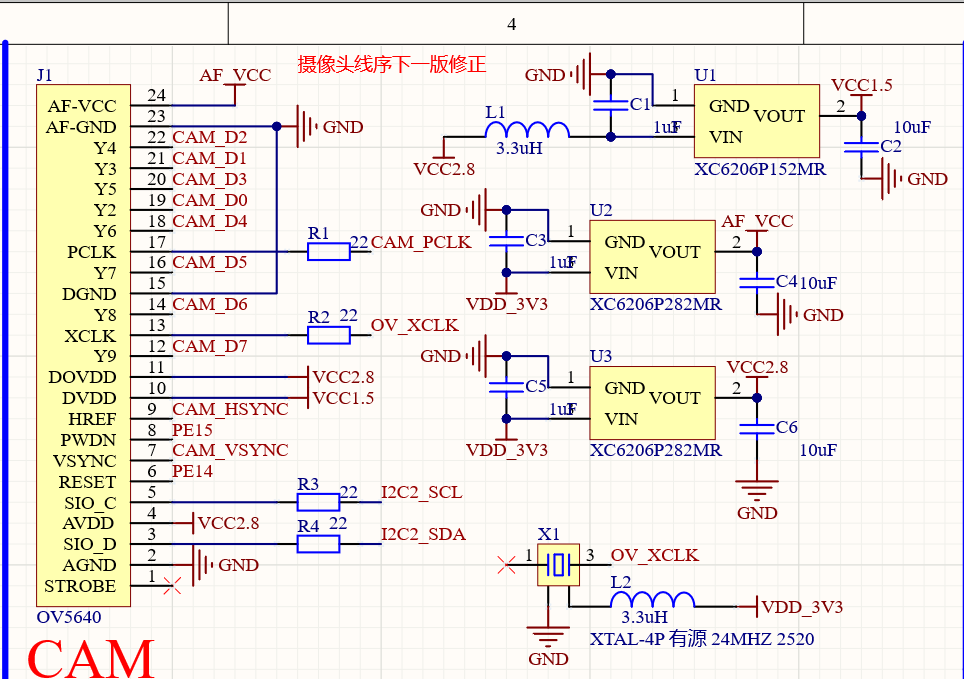
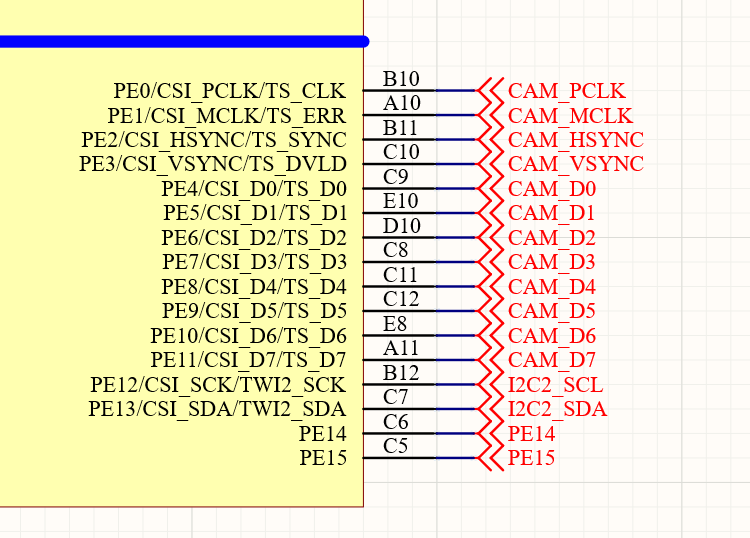
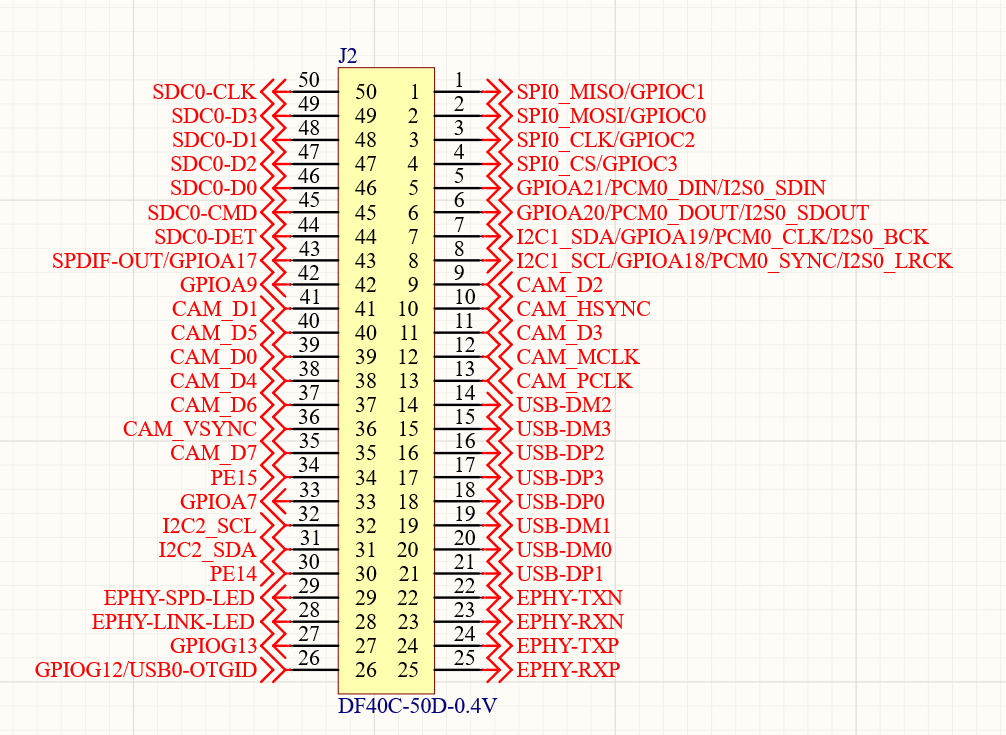
#111 Re: 全志 SOC » 自己画了一个全志H3 H5核心板 24X32mm BTB连接器 » 2020-05-08 17:54:45
wnwq wrote:
智能微纳检测技术研究所是做什么的
做和生物结合的一些检测仪器,这不是重点 哈哈哈
#112 Re: 全志 SOC » 自己画了一个全志H3 H5核心板 24X32mm BTB连接器 » 2020-05-08 13:16:01
最后关头发现CPU核心电源 铺的铜皮 一个地方只有20mil 走不了2.5A电流 赶紧撤回改了 。。。。。。。
#113 Re: 全志 SOC » 自己画了一个全志H3 H5核心板 24X32mm BTB连接器 » 2020-05-08 10:42:14
这个是全功能底板99X99mm
屏幕把BTB母座挡住了
这两个板子已经回来了 只是我还在返校隔离中 不能去取快递
我做的这些工作中有些地方参考借鉴了B站稚辉君的创意 我觉得他做的很棒
比如typeC 母座 两路USB分开 一路给了USB转双串口的CP2105 一路给了芯片的OTG
我买了一些了typec的公头 发现公头的数据接口其实只用了一面 所以可以通过正反插切换OTG和串口
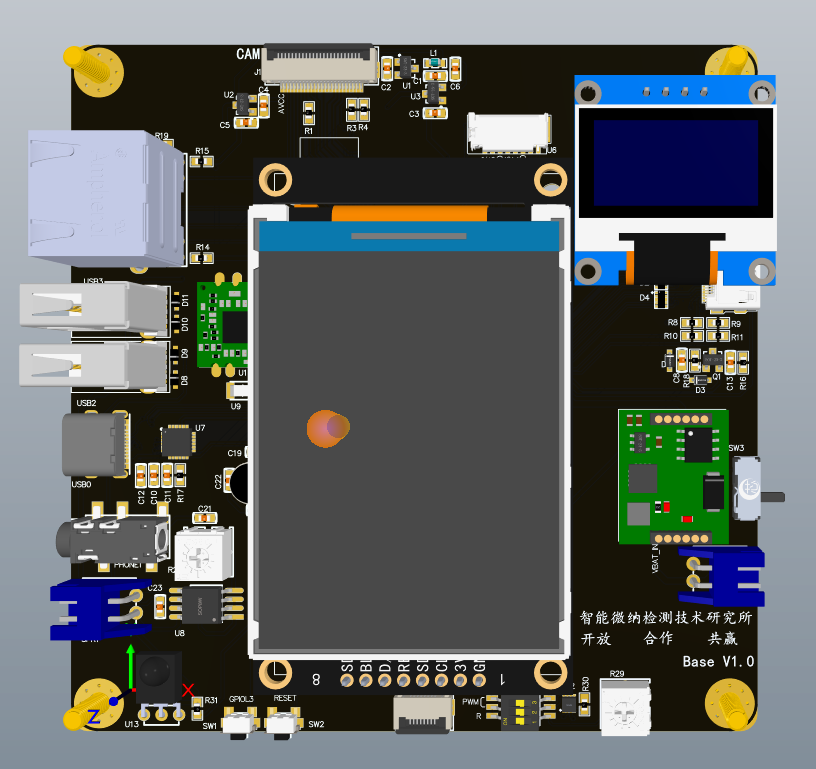
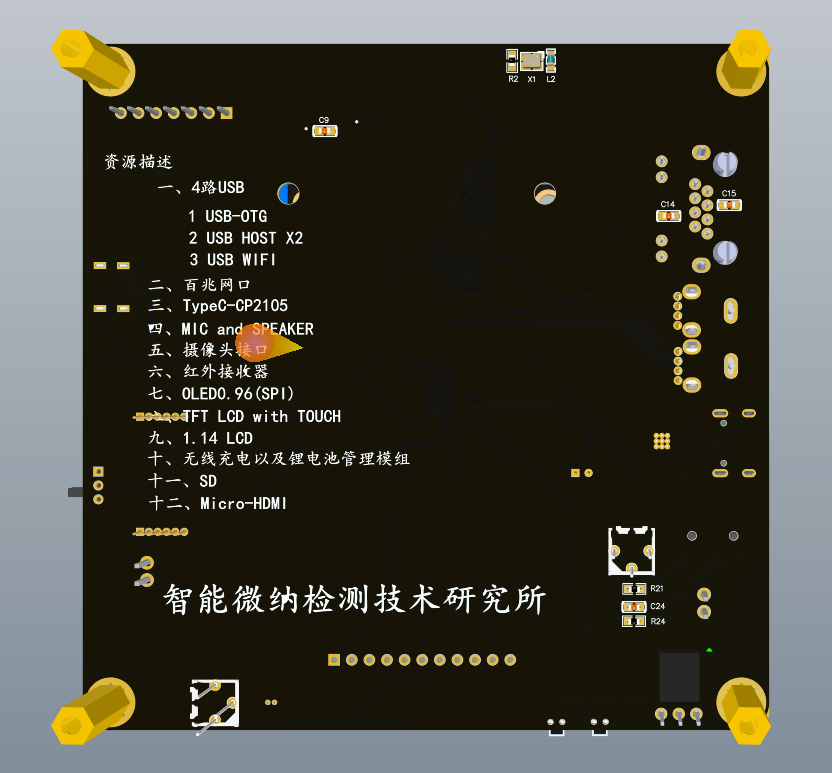
#114 Re: 全志 SOC » 自己画了一个全志H3 H5核心板 24X32mm BTB连接器 » 2020-05-08 10:39:09
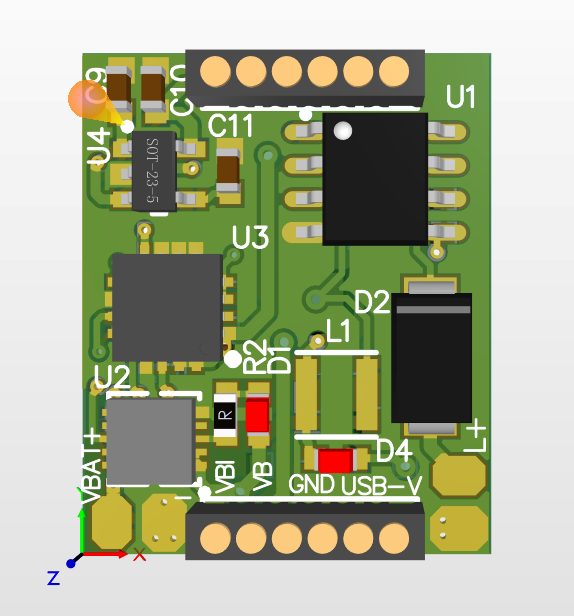
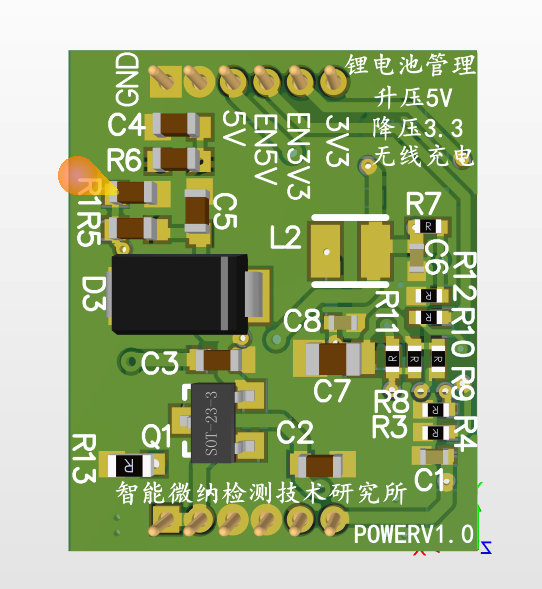
这个做的电源模块 1.27mm插针式的 15.5X19mm
功能:3.7V锂电池充放电管理、3.7V升压5V、3.7V降压3.3V、以及无线充电模块
#115 Re: 全志 SOC » 自己画了一个全志H3 H5核心板 24X32mm BTB连接器 » 2020-05-08 10:15:38
有梦的地方 wrote:
贴片机也买了吗?还是手工放料?
手工贴片吧 就80多个电容和电阻
#116 Re: 全志 SOC » 自己画了一个全志H3 H5核心板 24X32mm BTB连接器 » 2020-05-08 10:13:47
arychen wrote:
丝印太小了看不清。
板厂警告我了 我还是决定打了 应该问题不大 大不了再多打几次
只是想做一款令人满意的板子
我这个除了千兆没引出来 其他都有 网口就用H3 H5自带的百兆网口 应该足以使用
如果要全部引出 得再多18个管脚
只需要更换一个70pin的BTB连接器就行(https://www.hirose.com/product/c/DF40?lang=zh&q=%3ArecommendedSeries-desc%3AterminationProduct%3Afalse%3AnumberOfPositions%3A70&text=#)
用的他家的
对于我来讲的话 可能用不到 千兆的 不知道大家的需求是什么样子的 如果大家需要我再改进一下 但是打板可能好久之后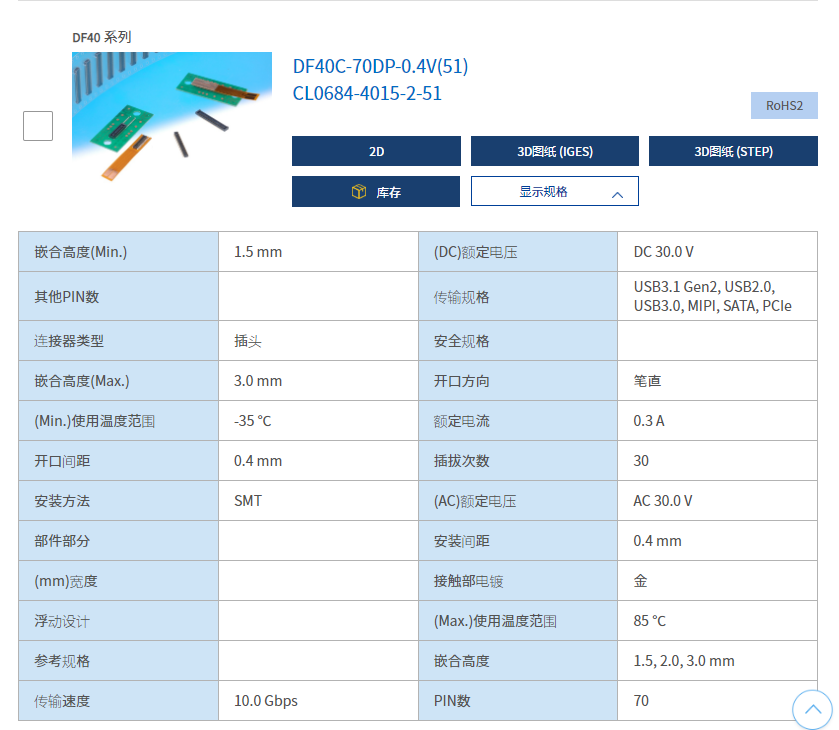
更新一下 我看了一下貌似没地方走线了。。。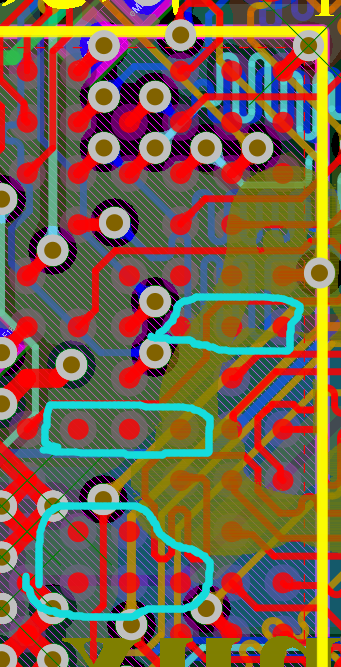
#117 Re: 全志 SOC » 自己画了一个全志H3 H5核心板 24X32mm BTB连接器 » 2020-05-08 09:56:53
didi wrote:
布局合理,渲染漂亮,坐等一把调试通过。
哈哈哈 板厂还在做工程处理 还没开始打板子 唉 我元器件都买好了。。。开的钢网也到了 买的回流焊机也到了 就差这个板子了
#118 Re: 全志 SOC » 自己画了一个全志H3 H5核心板 24X32mm BTB连接器 » 2020-05-08 09:55:05
mysteryli wrote:
人家都是水果派,你这里直接搞了个坚果派啊哈哈
也
嘿嘿嘿 以后多做几个坚果派, 开心果、榛子、腰果、榧子、白瓜子、葵花子、酱油瓜子、花生 、松子、栗子、核桃、莲子、巴旦杏 、芝麻、胡桃、喀什巴丹木、扁桃、无花果、大枣、葡萄干、夏威夷果。。。。
松子派我觉得可以
#119 Re: 全志 SOC » 自己画了一个全志H3 H5核心板 24X32mm BTB连接器 » 2020-05-08 09:44:54
rongwinzip wrote:
H3 H5 pin兼容的吗
兼容的 PIN TO PIN 只是H3 1.2V的供电电流2A H5 需要2.5A
H3用的SY8089A (SOT-235) H5用的SY8032A(SOT-236)
我原理图用的8089A, 如果要用H5的话 把8032A的5号管脚剪掉 就可以用了 电路是一样的
#120 Re: 全志 SOC » 自己画了一个全志H3 H5核心板 24X32mm BTB连接器 » 2020-05-08 09:39:24
atmal wrote:
等着你的好消息,哈哈
谢谢支持 到时分享
#121 Re: 全志 SOC » 摄像头驱动 主线DVP与MIPI-CSI2 » 2020-05-08 00:18:36
支持大佬
#122 Re: 全志 SOC » 自己画了一个全志H3 H5核心板 24X32mm BTB连接器 » 2020-05-07 11:01:48
板厂工程师居然说核桃是一坨。。。。说企鹅是菩萨。。。有意思 哈哈哈
#123 Re: 全志 SOC » 自己画了一个全志H3 H5核心板 24X32mm BTB连接器 » 2020-05-07 10:59:53
zhu520 wrote:
请问楼主按最后这样三缓冲操作,确实消除了图形边缘闪烁和保证刷新率稳定60fps吗?
老哥 我咋听不懂啊 。。。
#124 Re: 全志 SOC » 自己画了一个全志H3 H5核心板 24X32mm BTB连接器 » 2020-05-07 10:40:11
刚刚板厂打电话说要前后左右加0.4mm宽度 因为切割的刀子宽度0.8mm 会把焊盘和线路伤到 其实切割完 长宽还是基本不变的
#125 Re: 全志 SOC » 自己画了一个全志H3 H5核心板 24X32mm BTB连接器 » 2020-05-07 08:43:16
jcwangzi wrote:
模型做得不错,布局还可以

#126 Re: 全志 SOC » 自己画了一个全志H3 H5核心板 24X32mm BTB连接器 » 2020-05-07 08:29:44
arychen wrote:
哪家做的板子 几层的呀
我也喜欢每次做个两三百个,这样节省哈。 就算做废了板费没多花多少钱。每次大头是工程测试费这种
在华秋pcb做的。6层板,体积越小层数越多
#127 Re: 全志 SOC » 自己画了一个全志H3 H5核心板 24X32mm BTB连接器 » 2020-05-06 22:06:58
lghtjpu wrote:
核心板上应该留2个螺丝孔跟底板固定吧,这种接插件不固定容易松
三角形稳定结构。。。我感觉应该没啥大问题
要是加了孔 体积就会变大了
主要是为了做的小巧精致
10天后我焊接好 就做测试
#128 Re: 全志 SOC » 自己画了一个全志H3 H5核心板 24X32mm BTB连接器 » 2020-05-06 21:06:27
pickup wrote:
24 * 32 这尺寸够小。
就喜欢精致的小玩意
#129 Re: 全志 SOC » 自己画了一个全志H3 H5核心板 24X32mm BTB连接器 » 2020-05-06 18:25:15
liuchangyin wrote:
生成的3D效果图不错,祝打板一次成功
嘻嘻 谢谢大佬
#130 Re: 全志 SOC » 自己画了一个全志H3 H5核心板 24X32mm BTB连接器 » 2020-05-06 15:05:35
kekemuyu wrote:
第一次200片,为什么?出错了损失很大呀
有优惠券-100
下次做换个手机号 再用优惠券
#131 Re: 全志 SOC » 自己画了一个全志H3 H5核心板 24X32mm BTB连接器 » 2020-05-06 12:08:23
lghtjpu wrote:
这种B2B连接器贵么?
之前想用友善的NanoPi NEO Core的,只是没有引出HDMI
连接器 一对在4块钱左右
我这个除了千兆以太网没引出来 其他都ok
要引出千兆以太网接口的话得用60pin的座子
#132 Re: 全志 SOC » 自己画了一个全志H3 H5核心板 24X32mm BTB连接器 » 2020-05-06 11:51:16
dylan wrote:
模型做得不错,布局还可以
嘿嘿 DDR下边走了5V DRAM自己的电源层不完整 硬伤
#133 Re: 全志 SOC » 自己画了一个全志H3 H5核心板 24X32mm BTB连接器 » 2020-05-06 11:39:57
流氓兔 wrote:
一直以为AD不能呢, 学习到新姿势了!
没问题的
#134 Re: 全志 SOC » 自己画了一个全志H3 H5核心板 24X32mm BTB连接器 » 2020-05-06 11:39:14
sea18c wrote:
不错,不错,可以开直播了, 已经拿好小板凳了。
板子14号左右才能到 这段时间先看友善nanopi的资料学习下
#135 Re: 全志 SOC » 自己画了一个全志H3 H5核心板 24X32mm BTB连接器 » 2020-05-06 10:53:47
有梦的地方 wrote:
这渲染图很酷的赶脚。
哈哈哈 AD导出step 截图正反面 再用Keyshot9导入模型,在标签纹理中添加图片就可以了
#136 Re: 全志 SOC » 自己画了一个全志H3 H5核心板 24X32mm BTB连接器 » 2020-05-06 10:32:11
谢谢啦
#137 全志 SOC » 自己画了一个全志H3 H5核心板 24X32mm BTB连接器 » 2020-05-06 10:17:02
- yangshuwei
- 回复: 51
自己画的全志H3 H5核心板 24X32mm BTB连接器引出电源 和 100PIN 目前已经在打板生产了 后续如果验证通过 就分享给大家原理图和PCB
第一次画6层的 而且打了200片 可能有些设计缺陷 要是最后GG了 我就。。我就。。。我就。。。嗝屁了
BTB连接器嵌合高度1.5mm 64Gemmc高度也是1.5mm 刚刚好
终于学会怎么显示图片了
#138 Re: 全志 SOC » 继续开源串口屏硬件,新增MCU接口2.8寸屏,硬件图纸全开源,¥45 » 2020-05-01 23:16:01
下来看看 很NICE
页次: 1
- 首页
- » 搜索
- » yangshuwei 发表的帖子
东莞哇酷科技有限公司开发